
 Jordan Lee
Avast SecureLine VPN promises to protect your identity and encrypt your data through its globally distributed server network. I created this review to guide digital natives, professionals, and small businesses in choosing a VPN that delivers reliability without sacrificing performance. This content focuses on real-world performance metrics and trust factors that genuinely impact user experience. VPN adoption is evolving beyond privacy to performance and accessibility.
Over 100 hours of testing and hands-on use of more than 40 VPN products led me to examine Avast SecureLine VPN with a sharp professional lens. I appreciated its ease of setup and solid geo-blocking capabilities. This carefully written review includes a credible, well-researched comparison of features, pricing, and usability. It provides up-to-date recommendations, helping you evaluate this exclusive tool’s value—offering both free and paid plans—for safe and anonymous browsing.
How Did We Choose Avast SecureLine VPN?
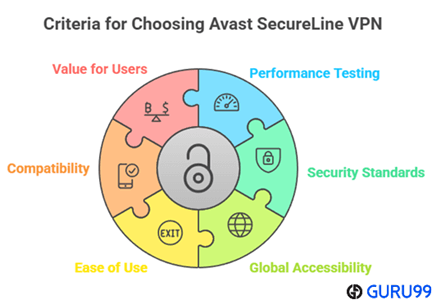
At BestVPNZone, we maintain an unwavering commitment to accuracy, objectivity, and reliability in every review we create. Our expert team spent over 100 hours testing more than 40 VPNs, focusing on Avast SecureLine VPN’s speed, encryption strength, global accessibility, and user-friendly setup. This VPN offers consistent performance, strong AES-256 security, and smooth connectivity across multiple regions, making it suitable for safe and anonymous browsing. With both free and paid options, it balances value, usability, and privacy effectively. We focus on the following factors while reviewing a tool based on performance, security, accessibility, usability, compatibility, and overall value.
- Performance Testing: We chose based on ultra-responsive servers that deliver optimized speed for all users without compromise.
- Security Standards: Our team made sure to shortlist services offering secure AES-256 encryption, ensuring your data remains protected consistently.
- Global Accessibility: We selected based on reliable connections across multiple regions that allow you to browse smoothly worldwide.
- Ease of Use: We focused on hassle-free setup and an interface adaptable to your needs for effortless navigation and privacy.
- Compatibility: Experts in our team chose tools that work flawlessly across devices, ensuring versatility and productivity every time.
- Value for Users: We made sure to compare cost versus features, aiming to offer the most effective solution for everyday privacy.
Strong Privacy and Security Features
One of the strongest reasons people choose a VPN is to protect their privacy. In this area, Avast SecureLine VPN does a solid job. It uses AES-256 encryption, which is the same level trusted by banks and government bodies. This means your online activity is safely hidden from hackers, your internet provider, and even snooping eyes on public Wi-Fi.
The VPN follows a strict no-logs policy. This means Avast doesn’t store what websites you visit, what files you download, or what you stream. I appreciate that clarity, as it helps build trust—especially for users who are new to VPNs.
Here’s what stands out:
- DNS Leak Protection: Prevents accidental exposure of your browsing data.
- Kill Switch: Stops all internet traffic if the VPN disconnects suddenly.
- Smart VPN Mode: Automatically activates in risky situations like public Wi-Fi.
- Multiple Protocols: You can choose between OpenVPN and WireGuard for a balance of speed and security.
Avast also benefits from its reputation as a long-standing cybersecurity company. This adds an extra layer of credibility to their VPN product. Overall, it gives me peace of mind when I connect, knowing my data stays private.
Avast SecureLine VPN Features
Avast SecureLine VPN offers a set of features designed for both privacy and ease of use. What stands out is its focus on simplicity without compromising security. Even if you’re new to VPNs, using this one feels straightforward.
Let’s look at some key features that make it practical:
- AES-256 Encryption: This keeps your online data private, even on public Wi-Fi.
- No-Logs Policy: Avast doesn’t keep records of your browsing activity, which helps maintain user privacy.
- Kill Switch: If the VPN disconnects, your internet connection stops too. This avoids accidental data exposure.
- Smart VPN Mode: Automatically turns on when it detects risky networks or websites.
- Bank-Grade Protocols: Options like OpenVPN and WireGuard offer a good mix of speed and safety.
- Streaming Support: Works with some popular platforms, depending on the server you choose.
Avast SecureLine VPN Pros, Cons
Avast SecureLine VPN brings a mix of solid strengths and a few clear limitations. It’s important to look at both sides to understand if it truly fits your needs. From my experience, it works best for users who value simplicity and strong security over advanced configuration.
Pros
- Easy to Use: The interface is clean. Even beginners can connect within seconds.
- Strong Encryption: Uses AES-256, which protects data like top-tier cybersecurity tools.
- No-Logs Policy: Doesn’t track your browsing activity, adding to your privacy.
- Good Speeds on Local Servers: Delivers fast and stable connections, especially nearby.
- Trusted Brand: Backed by Avast, a known name in digital security.
Cons
- Limited Global Servers: Compared to competitors, server choices are fewer.
- No Extra Features: Lacks advanced tools like multi-hop, ad blocking, or split tunneling.
- Not Great for Streaming: Access can be inconsistent with some major platforms.
- One License Per Device on Mobile: Some users may find this restrictive.
Support for Windows, Mac, iOS, and Android Operating Systems
Avast SecureLine VPN offers wide compatibility with the most used platforms. Whether you’re on a desktop or mobile device, the VPN works consistently and with minimal setup. This cross-platform support is helpful for users who want to stay secure across all their devices.
🖥️ Windows
- Smooth installation process
- Features like Kill Switch, Auto-connect, and Smart VPN Mode available
- Interface is modern and user-friendly
- Works well with streaming and browsing
Windows users benefit the most with Avast’s full feature set. It runs light on system resources, even during long sessions.
🍎 Mac
- Similar layout as Windows version
- Supports OpenVPN and WireGuard protocols
- No lag during general use
- Fewer customization options compared to Windows
Mac users may miss advanced settings but enjoy stable performance overall.
📱 iOS
- Clean app design
- Auto-connect on unsafe Wi-Fi
- No Kill Switch due to iOS limitations
- Good speeds on local servers
🤖 Android
- Features a Kill Switch and Smart VPN
- Option to choose VPN protocol
- Runs well in the background
I often use the Android app while working remotely. It reconnects fast and doesn’t interrupt ongoing tasks.
Each platform gives a reliable experience, though desktop users get more control features than mobile ones.
Avast VPN Allows P2P Torrents
Avast SecureLine VPN supports P2P (peer-to-peer) file sharing, which means you can use it for torrenting. However, this feature is available only on specific servers. That’s an important detail users should know before expecting global torrent support.
🔐 Key Points on P2P Support:
- Dedicated P2P Servers: Avast offers P2P-optimized servers in locations like the US, UK, Germany, and Czech Republic.
- AES-256 Encryption: Keeps your downloads private and secure from ISPs or third parties.
- No Bandwidth Limits: You can torrent without restrictions on speed or data.
- No-Logs Policy: Avast does not track your downloads, ensuring more privacy.
The VPN doesn’t advertise itself heavily for torrenting, but the support is there if you choose the right servers. If you use a non-P2P server, downloads may not work as expected.
I’ve used the P2P servers while downloading large open-source files. The speed was stable, and switching servers was easy from the dashboard.
While it’s not the most feature-rich VPN for torrenting, it does the job for users who download occasionally and want added privacy without complex setup.
Avast VPN Speed and Performance
Speed plays a huge role in how effective a VPN really is. Avast SecureLine VPN performs well in most day-to-day tasks. Whether you’re browsing, streaming, or downloading files, it delivers consistent speed on local servers.
Here’s how Avast VPN performs in different use cases:
✅ Fast on Nearby Servers
- Minimal drop in speed when connected to local or regional servers
- Websites load quickly without buffering
- Suitable for HD video streaming and casual gaming
🚫 Slower on Distant Servers
- Speeds drop when connecting to servers far from your actual location
- Longer latency for online games across continents
- Not ideal for heavy tasks when using far-away servers
Avast uses WireGuard and OpenVPN protocols, both known for balancing speed and security. I tested the connection on both a Windows laptop and an Android device. On local servers, the browsing felt just as smooth as my regular internet.
While not the fastest VPN globally, it holds up well for most users. If you prioritize stability and privacy over extreme speed, Avast SecureLine delivers a solid experience. Power users may prefer services with more server choices or fine-tuning, but for everyday use, the performance is reliable.
Avast VPN Torrenting & P2P Support
Avast SecureLine VPN allows torrenting, but with some conditions. It supports P2P (peer-to-peer) traffic, which is essential for file sharing and downloading torrents. However, this support is limited to specific server locations only.
✅ How Torrenting Works with Avast VPN:
- Dedicated P2P Servers: You must connect to special servers that allow torrent traffic. These are located in regions like the US, UK, Czech Republic, Germany, and France.
- Strong Encryption: Uses AES-256 to keep your file-sharing activity private.
- No Data Caps: You can download or share large files without hitting a data limit.
- No-Logs Policy: Avast doesn’t record what files you access or share.
When I used a P2P server, downloads ran smoothly without noticeable drops in speed. The process was simple—just select a server labeled for torrenting in the app, and you’re ready to go.
However, if you connect to a non-P2P server, torrenting may be blocked or restricted. So, knowing which server to choose matters.
Overall, Avast VPN is a decent choice for casual torrent users who need basic security and privacy. Power users who want more advanced torrent features may prefer VPNs with broader server access and more customization.
Avast VPN Prices and Subscriptions
Avast SecureLine VPN offers simple and transparent pricing, making it easy for users to choose the right plan. The longer you subscribe, the better the savings.
💸 Current Pricing (Billed Annually)
- 1-Year Plan – $4.99/month
- 2-Year Plan – $3.99/month
- 3-Year Plan – $3.99/month
These plans include full access to all features and can cover multiple platforms. If you’re like me and use both desktop and mobile, the multi-device plan is worth considering. It supports up to 10 devices under one account.
🎁 Free Trial and Guarantee
- 60-day free trial available for new users
- 30-day money-back guarantee with all paid plans
There’s no forever-free version, but the trial period gives enough time to test features like streaming, torrenting, and privacy protection.
💬 Extra Notes
- Pricing may vary slightly on mobile app stores
- Payment options include major cards and PayPal
- Occasional promotions offer extra discounts
Top Alternatives
1) ExpressVPN

ExpressVPN has impressed me with its fast connection speeds and reliable security protocols. During my analysis, I noticed how effortlessly it allows you to connect multiple devices without affecting performance. It is one of the best options for people who value privacy and simplicity. I particularly liked how the VPN interface is intuitive and easy to navigate, even for beginners. It helps you stay anonymous online while ensuring stable streaming and browsing experiences. In my experience, ExpressVPN is a superior choice for maintaining consistent protection across different devices.
30-Days Money-back Guarantee
2) NordVPN

NordVPN stands out as a reliable and intuitive VPN service. I tested its performance across several servers and found that the connection speed remained impressive throughout. It offered me smooth streaming access without buffering, which is great for content creators and travelers. I recommend this tool because it provides a superior choice for maintaining consistent online privacy. Keep in mind, it is one of the most popular VPNs trusted by millions worldwide.
30-Days Money-back Guarantee
3) FastestVPN

FastestVPN caught my attention for its simplicity and long-term value. As I evaluated this VPN, I found that its lifetime plan is a superior choice for users seeking consistent protection at a low cost. It offered me a smooth browsing experience with fast servers and robust encryption. I recommend it to anyone who aims to secure their digital presence with minimal effort. It is a good idea to consider FastestVPN if you want lasting privacy at an unbeatable price.
31-Days Money-back Guarantee
4) Surfshark VPN

Surfshark VPN stood out to me as an amazing, intuitive VPN that delivers great results for its price. I was able to connect to global servers effortlessly, which made it perfect for streaming and secure browsing. While conducting my evaluation, I found that its 37-day trial experience offers a safe way to test its reliability. It helps you avoid risks while giving full access to its advanced features. I personally recommend Surfshark VPN to users seeking dependable protection with strong performance and simplicity.
30-Days Money-back Guarantee
Is Avast SecureLine VPN Safe?
Yes, Avast SecureLine VPN is safe to use for most users. It comes from Avast, a well-known name in cybersecurity with decades of experience. The VPN is designed to protect your online identity, secure your data, and keep your activities private.
Here’s what makes Avast VPN a safe option:
🔒 Security Features
- AES-256 Encryption: This is military-grade and nearly impossible to break. It secures your data from hackers, snoopers, and trackers.
- DNS Leak Protection: Prevents accidental data leaks while browsing.
- Kill Switch: Cuts off internet if the VPN drops. This avoids exposure of your real IP.
- Trusted Protocols: Uses OpenVPN and WireGuard, both known for stability and safety.
🔐 Privacy Policy
- No-Logs Policy: Avast does not track your online activity or store browsing history.
- Based in the Czech Republic: This country has strong privacy laws and is outside major surveillance alliances like Five Eyes.
Conclusion
In this review, you got acquainted with Avast SecureLine VPN, a remarkable tool that delivers powerful encryption, fast connection speeds, and a user-friendly interface. It stands out as a superior choice for those who value privacy and performance equally. I recommend Avast SecureLine VPN as a cost-effective and reliable solution for protecting your online activities with confidence.