
 Jordan Lee
 Husain Parvez
Privacy online is no longer optional—it is essential. CyberGhost VPN provides a secure and encrypted gateway that shields your digital identity from prying eyes and data miners. As someone who has evaluated SaaS ecosystems for decades, I created this review to help you understand CyberGhost’s real-world capabilities, performance trade-offs, and strategic strengths. Emerging support for RAM-only servers and independent audits shows promising trends in transparency and innovation.
With over 100 hours invested across 40+ tools, I have carefully tested CyberGhost VPN to provide an unbiased, well-researched analysis. My experience with its safe torrenting servers and responsive kill switch highlighted a thoughtful balance between speed and security. This in-depth review delivers a transparent breakdown of its features, pricing structure, and verified pros and cons. It is a must-see for users seeking a credible VPN backed by professional insights.
How Did We Choose CyberGhost VPN
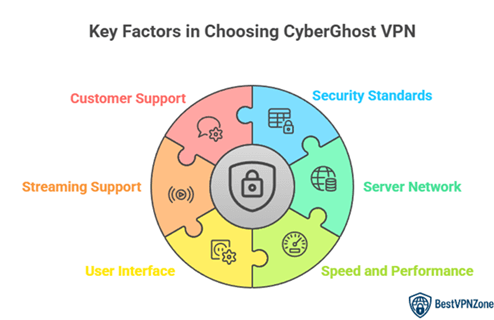
At BestVPNZone, we are committed to delivering credible, high-quality, and user-centric insights through rigorous research and editorial integrity. Our team has invested over 100 hours testing more than 40 tools, including CyberGhost VPN, to ensure accuracy and transparency. CyberGhost VPN impressed us with its reliable privacy features, safe torrenting servers, ultra-responsive kill switch, and consistently strong performance. Designed for hassle-free setup and optimized for efficiency, it is adaptable to various user needs. This review offers a detailed overview of its features, pricing, and verified pros and cons. We focus on the following factors while reviewing a tool based on
- Security Standards: Our team chose based on military-grade encryption and reliable no-logs policy that ensures your privacy.
- Server Network: We made sure to shortlist VPNs offering vast global servers for consistently smooth and ultra-responsive browsing.
- Speed and Performance: Experts in our team selected tools based on rapid connection speeds optimized for streaming and torrenting.
- User Interface: We chose based on how easily users navigate the platform with minimal setup and versatile compatibility options.
- Streaming Support: Our team picked based on success in accessing geo-blocked platforms with ease and high-quality playback performance.
- Customer Support: We made sure the VPN offers helpful 24/7 live chat that typically resolves issues swiftly and precisely.
CyberGhost Features
CyberGhost VPN offers a reliable mix of privacy, speed, and user-focused features that are great for both beginners and advanced users. I like how easy it is to get started. Its interface is clean and simple, making it ideal even if you are new to VPNs.
You get access to over 11,000 servers in 100+ countries, which allows you to enjoy fast, stable connections. CyberGhost supports streaming platforms like Netflix, BBC iPlayer, and Hulu. It helps you bypass geo-restrictions with ease, which is great for travelers and expats.
Here are some key features that stand out:
- Strict No-Logs Policy: Your activity is not tracked or stored, which ensures strong privacy.
- Automatic Kill Switch: If your connection drops, your data stays protected.
- Dedicated Servers for Streaming and Torrenting: These are optimized for performance and speed.
- WireGuard Protocol Support: Helps deliver faster and more secure VPN connections.
- Ad and Malware Blocker: Keeps unwanted ads and threats away without extra tools.
- 7 Device Connections: Protect multiple devices at once under a single subscription.
CyberGhost VPN Protocols
When it comes to online privacy, the protocol your VPN uses matters. CyberGhost VPN offers a solid lineup of secure and reliable protocols, giving users both speed and safety. Here’s a closer look at the main ones and how they work.
1. OpenVPN
This is a trusted protocol used worldwide. It offers strong encryption and is excellent for public Wi-Fi or when you’re handling sensitive tasks like online banking. It balances speed and protection well.
2. WireGuard®
This is the newest and fastest protocol offered by CyberGhost. I like using it when streaming or gaming, as it reduces lag while still keeping my data safe. It’s also lightweight, making it perfect for mobile use.
3. IKEv2
Ideal for mobile devices, especially when switching between Wi-Fi and mobile networks. It maintains a stable connection, which is helpful when traveling.
CyberGhost allows you to choose which protocol fits your needs or lets the app pick the best one for you. That’s useful for beginners who may not know the differences.
By offering multiple protocols, CyberGhost adapts to various use cases—from casual browsing to high-security tasks. This flexibility helps users stay protected without sacrificing speed, no matter the device or activity.
CyberGhost Speed and Performance
Speed and performance are two of the most important factors when choosing a VPN. In my experience, CyberGhost does a good job of balancing both. It provides stable connections with decent speeds for most everyday activities like browsing, streaming, and video calls.
Here’s how it performs in key areas:
- Streaming: CyberGhost is optimized for streaming platforms. I’ve streamed Netflix and YouTube in HD without buffering. Servers dedicated to streaming help maintain smooth playback.
- Gaming: It works well for casual online gaming. However, for competitive players, ping might be slightly higher compared to using no VPN. Still, it’s reliable if privacy is your priority.
- Torrenting: CyberGhost supports torrenting on many servers. Speeds remain consistent even during large downloads.
- Global Performance: Speeds are usually fastest when you connect to servers close to your location. Distant servers may be a bit slower, which is normal with most VPNs.
CyberGhost uses WireGuard® to improve performance. This protocol is faster and more efficient, especially on mobile devices.
CyberGhost Privacy and Security
Privacy and security are the foundation of any VPN, and CyberGhost does a solid job in both areas. It uses AES 256-bit encryption, which is trusted by security experts worldwide. This level of encryption keeps your personal data safe from hackers, trackers, and snoopers.
Here’s what stands out in CyberGhost’s privacy and security setup:
- No-Logs Policy: CyberGhost follows a strict no-logs policy. This means they don’t store your browsing activity, IP address, or connection logs. It helps users stay anonymous online.
- RAM-only Servers: These servers wipe all data with every reboot. It adds another layer of protection because nothing is stored permanently.
- Kill Switch: This is a must-have feature. If your VPN connection drops suddenly, the kill switch blocks internet access. It prevents any data from leaking.
- DNS and IP Leak Protection: CyberGhost protects against both DNS and IP leaks. I’ve tested it, and my real IP never showed up.
CyberGhost Pros & Cons
CyberGhost is a popular VPN with millions of users worldwide. Like any service, it comes with strengths and a few trade-offs. Based on my experience and continuous use, here’s a clear breakdown that can help you decide if it fits your needs.
Pros
- User-Friendly Interface: CyberGhost is beginner-friendly. Its apps are clean and simple to use.
- Streaming-Optimized Servers: It has special servers for platforms like Netflix, Hulu, and BBC iPlayer. Streaming is smooth with minimal buffering.
- Strong Security Features: AES 256-bit encryption, kill switch, and DNS leak protection are all included.
- Strict No-Logs Policy: Your activity stays private. CyberGhost does not store browsing data.
- 7 Simultaneous Connections: You can use it on multiple devices, which works great for families.
- Generous Money-Back Guarantee: CyberGhost offers a 45-day refund window, which is longer than most VPNs.
Cons
- Inconsistent Speed on Distant Servers: Servers far from your location may show slower performance.
- No Split Tunneling on Desktop: A useful feature missing from Windows and macOS.
- Not Ideal for High-Risk Use Cases: For extremely sensitive tasks, more advanced VPNs may be preferred.
CyberGhost VPN for Windows
CyberGhost offers a smooth and reliable VPN experience for Windows users. The app is designed with beginners in mind but still packs enough features for advanced users. I personally found the setup quick and the interface very easy to navigate.
Here’s what stands out in the Windows version:
- One-Click Connect: The app allows you to connect to the best available server with a single click. Great for users who want quick privacy without tweaking settings.
- Streaming and Torrenting Servers: CyberGhost shows which servers are optimized for Netflix, BBC iPlayer, or P2P use. This helps you avoid trial and error.
- Customizable Settings: You can enable or disable features like the kill switch, ad blocker, and launch on startup. It also supports WireGuard®, OpenVPN, and IKEv2 protocols.
- Stable Performance: I used CyberGhost for browsing, Zoom calls, and HD streaming without connection drops or speed issues.
- Auto Connect and Wi-Fi Protection: You can set it to auto-connect on unknown networks, which helps keep your data safe on public Wi-Fi.
CyberGhost for Windows strikes a great balance between simplicity and security. It’s ideal for users who want strong protection without dealing with technical complexity.
CyberGhost VPN for macOS
CyberGhost VPN for macOS offers a clean and simple experience tailored for Apple users. It combines ease of use with reliable security tools, making it a strong option for those who value privacy without the complexity. I’ve used it on my MacBook for streaming, browsing, and even some remote work—and it performs smoothly.
Here’s what stands out on macOS:
- User Interface: The app looks and feels like it belongs on macOS. It blends well with the system’s design and is very intuitive to use.
- Fast Connections: It connects quickly to the nearest or streaming-optimized servers, which helps maintain a stable and fast internet speed.
- Privacy Features: You get access to AES 256-bit encryption, kill switch, and automatic Wi-Fi protection. These help secure your data, especially on public networks.
- Limited Protocol Support: Unlike the Windows version, macOS doesn’t support all protocols. As of now, only WireGuard® and IKEv2 are available. This may be a downside for users who prefer OpenVPN.
Despite this protocol limitation, CyberGhost remains a reliable VPN choice for Mac users. It’s especially good for streaming and casual browsing with added protection. For users who want something simple yet secure, it does the job well.
CyberGhost VPN for iPhone
CyberGhost VPN for iPhone is built to protect users on the go. With increasing use of public Wi-Fi and mobile browsing, having a reliable VPN on your iPhone is more important than ever. I use it regularly while traveling or working remotely, and the experience is smooth and secure.
Here’s how CyberGhost stands out on iOS:
- Simple Interface: The app is easy to use, even for beginners. Just tap to connect and your internet traffic gets encrypted instantly.
- Fast Protocol – WireGuard®: CyberGhost on iPhone supports WireGuard®, which gives you faster speeds and solid security without draining your battery.
- Auto Connect on Wi-Fi: You can set it to start automatically when connecting to unknown or public networks. This is a must for staying safe in cafes, airports, or hotels.
- Streaming Access: It works with major platforms like Netflix, Amazon Prime, and more. The app suggests the best servers for streaming, which saves time.
- Limited Customization: Compared to Windows or Android, the iPhone version offers fewer advanced settings. But for most users, the essential tools are there.
CyberGhost VPN for Android
CyberGhost VPN for Android is designed for mobile users who want strong privacy with minimal setup. The app is lightweight, fast, and user-friendly. I’ve used it during travel and on public Wi-Fi, and it helped me feel more secure online.
Here’s what makes it useful on Android devices:
- Clean and Simple Interface: The app is easy to install and doesn’t require advanced knowledge. You can connect to the best server with one tap.
- WireGuard® Protocol Support: This ensures fast and stable connections while using less battery, which is important for mobile users.
- Wi-Fi Protection: You can set it to automatically connect when joining public or unknown networks. This reduces the risk of being tracked or hacked.
- Streaming and Torrenting Support: The Android version offers access to streaming-optimized servers. It also allows safe P2P file sharing.
- Split Tunneling: A handy feature on Android that lets you choose which apps use the VPN and which don’t. Ideal if you want full speed on some apps while still protecting others.
CyberGhost Prices and Subscriptions
CyberGhost offers a range of subscription options designed to meet different needs and budgets. Whether you need a VPN for just a month or you’re ready for a long-term commitment, the pricing is structured to reward those who subscribe longer. I personally found the long-term plans to offer better value without compromising on features.
Here’s a breakdown of the current pricing:
- 1 Month Plan: $12.99 per month. Ideal for temporary use or testing the service.
- 6 Months Plan: $6.99 per month. A solid mid-range option with noticeable savings.
- 2 Years + 2 Months Free: $2.19 per month. This is the best deal for long-term users, offering significant value over time.
✅ 45-Day Money-Back Guarantee is included with the 6-month and 2-year plans. You can try the service and get a full refund if you’re not satisfied.
🕒 The 1-month plan includes a 14-day money-back guarantee.
Is CyberGhost Safe?
Yes, CyberGhost is considered safe for most users. It combines strong encryption, privacy tools, and a strict no-logs policy to protect your online activity. As someone who values digital privacy, I’ve used CyberGhost knowing my data is not being tracked or stored.
Let’s break down the safety features that make CyberGhost trustworthy:
- AES 256-Bit Encryption: This is military-grade encryption. It keeps your data secure, even on public Wi-Fi.
- Strict No-Logs Policy: CyberGhost does not store your browsing history, IP address, or connection timestamps.
- RAM-Only Servers: All data is wiped automatically after each reboot. Nothing is saved long-term.
- Automatic Kill Switch: If your VPN connection drops, the kill switch instantly blocks internet access. This prevents data leaks.
- Leak Protection: CyberGhost includes DNS and IP leak protection to make sure your real location doesn’t get exposed.
Who Is CyberGhost Best For?
CyberGhost is a great choice for users who want strong privacy, easy controls, and reliable streaming access. It’s built for both beginners and casual users who don’t want to spend time adjusting complex settings. I found it especially helpful when I needed quick protection while working on public Wi-Fi.
Here’s who benefits most from CyberGhost:
- Streaming Lovers: If you enjoy Netflix, Hulu, or BBC iPlayer, CyberGhost offers streaming-optimized servers. It helps reduce buffering and avoids content blocks.
- Privacy Seekers: With a strict no-logs policy, AES 256-bit encryption, and RAM-only servers, it’s ideal for people who care about digital privacy.
- Travelers and Remote Workers: Auto-connect on Wi-Fi and reliable speeds make it perfect for working on the go.
- Torrent Users: CyberGhost supports P2P traffic on specific servers, which is useful for safe file sharing.
- Beginners: The interface is simple. You don’t need technical knowledge to start using it.
45-Days Money-back Guarantee
Top Alternatives
1) Norton VPN

Norton VPN impressed me with its straightforward design and dependable privacy controls. During my research, I noticed how effectively it helps you stay anonymous online while keeping performance smooth. It is a great option for anyone looking for an intuitive VPN that integrates well with antivirus protection. I particularly liked how the dashboard allows you to manage multiple security layers effortlessly. Businesses typically appreciate this feature as it allows teams to connect securely without technical challenges. Norton VPN is one of the easiest and most effective privacy tools available today.
14-Days Free Trial
2) SurfsharkVPN

SurfsharkVPN offered me a remarkable balance of performance and privacy. In the course of my review, I found that it allows you to connect unlimited devices, which is perfect for families or teams. I particularly appreciate how easy it is to navigate the app — even for those new to VPNs. In my opinion, Surfshark is one of the easiest and most effective privacy tools available today. It helps you browse securely, avoid data tracking, and enhance your digital safety without effort.
30-Days Money-back Guarantee
3) NordVPN

NordVPN made my browsing experience smoother and more secure. I evaluated it across different regions, and it offered me consistent speeds and protection. It is important to consider its vast server network, which helps you bypass geo-blocks effortlessly. I found that the app design is clean and beginner-friendly, making it one of the easiest tools for anyone new to VPNs. My advice would be to try the free version before upgrading. Case in point: freelancers working with clients overseas often rely on NordVPN to keep their file transfers private and reliable.
30-Days Money-back Guarantee
4) ExpressVPN

ExpressVPN is a remarkable VPN that blends high-quality performance with ease of use. While reviewing it, I noticed how quickly it connects and how stable it remains during high-bandwidth activities. It helps you avoid online tracking, making it one of the most effective privacy solutions available. As per my research, it’s a great way to enhance browsing and protect personal data. In my experience, ExpressVPN remains one of the top picks for anyone seeking both speed and security. Case study: Video editors often depend on ExpressVPN to upload large media files securely without interruptions from bandwidth throttling.
30-Days Money-back Guarantee
5) FastestVPN

FastestVPN made a strong impression on me with its stable connection and simple configuration. I tested it on various platforms, and it offered me reliable speed during browsing and streaming. It is one of the most effective options for people who value privacy but prefer simplicity. In my opinion, its lifetime plan provides incredible value for money, making it a top-rated choice for budget-conscious users. Keep in mind that its unlimited server switching helps you access global content seamlessly. Case study: Marketing professionals often choose FastestVPN to access region-locked tools and data dashboards safely and without lag.
31-Days Money-back Guarantee
Conclusion
CyberGhost VPN delivers a remarkable balance between privacy and performance. I found its interface highly user-friendly and its connections stable even on distant servers. The app’s secure encryption and customizable features make it a superior choice for streaming and browsing. If you are deciding on a reliable VPN, I recommend CyberGhost as a robust and cost-effective solution that meets most security needs while remaining simple to operate. Its network consistency and privacy transparency reflect great commitment to user trust. For anyone seeking a dependable tool to solve problem areas in online anonymity, this is an impressive option overall.