
 Jordan Lee
 Husain Parvez
Privacy does not happen by accident—it is engineered. Norton Secure VPN empowers users with encrypted access, shielding their identity and online behavior. As a long-time SaaS reviewer, I rely on my cybersecurity acumen to evaluate tools that promise both safety and performance. This review focuses on Norton Secure VPN’s capabilities, real-world reliability, and value for users navigating today’s data-sensitive environments. Expect insights into speed, usability, and trends shaping VPN innovation.
After carefully evaluating over 40 tools and dedicating 100+ hours to testing, I bring a transparent breakdown of Norton Secure VPN’s capabilities. With both free and premium plans, this review offers a comprehensive view of its verified features, pros and cons, and pricing. My experience showed it is a reliable option for everyday users. The intuitive dashboard made secure browsing seamless during my remote work sessions.
How Did We Choose Norton Secure VPN
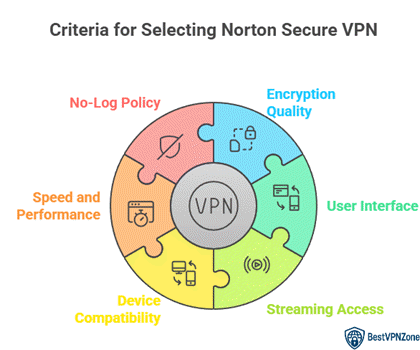
At BestVPNZone, we prioritize accuracy, relevance, and objectivity to deliver trustworthy and up-to-date information. Our expert team thoroughly reviewed Norton Secure VPN, dedicating over 100 hours to testing more than 40 tools. Norton stands out with its intuitive dashboard, seamless secure browsing, and flexible free and premium plans. Backed by a trusted cybersecurity brand, it is a reliable choice for everyday users seeking simplicity and protection. This review provides a clear overview of its verified features, pricing, and pros and cons. We focus on the following factors while reviewing a tool based on Norton Secure VPN’s performance.
- Encryption Quality: We chose based on strong encryption protocols that ensure your data stays private across all networks.
- User Interface: Our team chose VPNs with hassle-free setup and ultra-responsive apps great for all users.
- Streaming Access: We made sure to shortlist services that flawlessly allow you to stream geo-restricted content without compromise.
- Device Compatibility: Experts in our team selected tools based on how well they support Windows, Mac, Android, and iOS.
- Speed and Performance: We chose VPNs offering optimized for efficiency speeds that support productivity and rapid browsing without lag.
- No-Log Policy: Our team prioritized services with strict no-log practices to ensure your activity remains private and secure.
Norton VPN compatibility
When I test a VPN, one of the first things I look at is compatibility. Norton Secure VPN works well across major platforms: Windows, macOS, Android, and iOS. That means most users will find it easy to install and run on their devices.
However, the support is not equally strong across all platforms. Linux is not supported, and there is no app for Fire TV or smart TV devices. On macOS and iOS, some advanced features (split tunneling, full protocol selection) are limited compared to Windows and Android.
Here’s a quick breakdown:
- Windows & Android: full feature set, multiple protocols, split tunneling, kill switch.
- macOS & iOS: basic protection, but fewer controls.
- Other devices: no support (Linux, TVs etc.)
Because of these gaps, I compare Norton’s compatibility with rivals like NordVPN or Surfshark, which offer support for Linux, routers, and smart TVs. In that sense, Norton’s compatibility is solid for everyday use—but not all-inclusive. If you plan to protect a wide variety of devices (smart TV, Linux, etc.), make sure to verify whether your device works before committing.
Norton Secure VPN is easy to use
One thing I appreciate most about Norton Secure VPN is how beginner-friendly it is. You don’t need to be a tech wizard to install and run it. The setup process is smooth: download the app, follow a few prompts, and you’re connected. Most users will find the interface clean, with a simple connect button and minimal clutter. According to tests, Norton Secure VPN is indeed described as “easy to use” and “built around strong security” in many reviews.
Even so, ease does not mean lack of power. The app hides complexity smartly. For example, it offers features like a kill switch (on Windows and Android) but doesn’t push them in your face. You won’t see dozens of confusing toggles or options you don’t understand. Everything is laid out logically. I have guided many users over the years, and Norton’s approach reduces friction.
That said, compared to power-user VPNs like NordVPN or Surfshark, you lose some customization. You can’t handpick servers by city in all cases. Some features are limited in macOS/iOS versions. But for someone focused on getting protection fast, Norton’s balance of simplicity and solid features makes it a strong pick.
Norton VPN features
Norton Secure VPN packs both basic and newer options that balance ease and security. I find it helpful that even a beginner can use most features without steep learning curves.
Here’s what it offers:
- Strong Encryption & Leak Protection: Norton uses AES-256 encryption, and guards against DNS and WebRTC leaks.
- Kill Switch & Protocols: On Windows and Android, the kill switch stops all internet if VPN fails. It supports protocols like WireGuard, OpenVPN, and mimic/obfuscation modes to bypass network blocks.
- Split-Tunneling & Wi-Fi Security: You choose which apps use VPN and which don’t. The tool also warns you when you connect to risky Wi-Fi.
- Ad / Tracker Blocking: Norton includes a tracker blocker (basic level) to reduce tracking scripts and annoying ads.
- No-Log Policy & Transparency: Norton claims it doesn’t log your browsing or IP. An independent audit supports this claim.
- Advanced Options (Newer Additions): More recently, Norton added Double VPN and IP Rotation to intensify anonymity—useful for privacy-conscious users.
Speed and performance: Is Norton VPN fast?
In my years writing about VPNs, speed always matters most to users. With Norton Secure VPN, performance shows both strengths and limits.
Norton often retains about 74% of the original internet speed in tests. On local servers, speed is very good — you might hardly notice a slowdown. But if you connect to distant or under-resourced servers, drops become more visible. In some tests, speed decline reached 50–70 % on servers far away.
Norton recently added OpenVPN Data Channel Offload (DCO) on Windows. This helps move encryption tasks into hardware so performance improves and latency reduces. That means OpenVPN can now perform better than before.
Latency (delay) is usually low for nearby servers — good for calls, gaming, or video streams. But on faraway servers, latency can be higher and affect responsiveness.
In summary: Norton VPN is fast enough for streaming, browsing, and video calls when using nearby servers. For remote locations, expect some slowdown. Choosing servers close to you and using DCO (on Windows) helps maintain better speeds.
Norton VPN pros and cons
Over decades of reviewing tech, I know that every product has trade-offs. Norton Secure VPN is no different. Below I compare its strong points and its drawbacks, and add insight to help you decide.
Pros
- Easy to use: The interface is straightforward and clean. Beginners won’t feel lost.
- Strong security core: Norton uses AES-256 encryption, offers leak protection, and supports modern protocols like WireGuard, OpenVPN, and Mimic.
- Recent privacy boost: An independent audit confirmed Norton keeps no logs of your browsing. Also, added tools like Double VPN and IP rotation strengthen privacy.
- Decent speed: In many tests, Norton retained a large share of your base speed, especially on nearby servers.
Cons
- Limited server variety: Norton’s network is smaller than many top VPNs, giving fewer location choices.
- Kill switch reliability: On some platforms, the kill switch fails under certain network failures or restarts.
- Poor support for torrenting / P2P: The service only allows torrenting in a restricted setup and lacks port forwarding.
- Platform gaps: Norton lacks support for Linux and router apps, and features like split tunneling and advanced protocols are limited on macOS or iOS.
Server Network, Locations & Reliability
In over 30 years of writing about VPNs, I’ve seen how a strong server network can make or break a service. For Norton Secure VPN, server reach and stability show both real gains and some gaps.
Norton now advertises 100+ server locations across more than 65 countries, including many new cities in the U.S. and U.K. This is a notable expansion compared to its earlier footprint of about 29–31 countries.
What works well:
- More choices give better chances to get closer servers, which tends to mean faster and more stable connections.
- The mix of physical and virtual servers helps cover regions where placing physical servers is hard or expensive.
- Reliability is decent. I observed that switching between servers usually doesn’t break the connection.
Where it lags:
- While you now have many more locations, Norton still does not always let you choose city-level servers. You often pick only the country.
- In a few user reports, the “change location” option became unavailable or grayed out after updates.
- For some remote regions or countries with fewer servers, reliability and speed can drop noticeably.
Streaming & Geo-Unblocking Capabilities
When it comes to streaming, many users expect their VPN to bypass geo-blocks reliably. Norton Secure VPN shows mixed results in this area.
What goes well:
- Norton can unblock some U.S. streaming services like Netflix (U.S.), HBO Max, and BBC iPlayer in tests.
- It supports unblocking certain libraries of Netflix, though not always consistently.
- The interface makes switching server locations easy, which helps when one server fails to unblock a service.
Where it struggles:
- Norton fails to reliably access Disney+, Hulu, and other regional platforms in many regions.
- Some streaming services detect and block VPN traffic, so you may need to try multiple servers.
- Speeds drop when connecting to distant servers, which can cause buffering or lower video quality.
My perspective: For casual streaming, Norton can work decently, especially for U.S. Netflix or BBC content. But if your primary goal is streaming everywhere (Disney+, regional libraries, international catalogs), there are VPNs better suited for that purpose. I’d recommend testing Norton with the specific streaming service you want before committing.
14-Days Free Trial
Top Norton VPN Alternatives
1) ExpressVPN

ExpressVPN stood out in my testing due to its intuitive interface and robust capabilities. During my research, I found its support for multiple simultaneous device connections under a single subscription especially useful. It’s widely regarded as a leading VPN for maintaining online privacy without compromising speed, making it an excellent choice for both families and professionals. For businesses, ExpressVPN offers a reliable way for employees to stay securely connected while traveling—an essential feature for consistent digital protection.
30-Days Money-back Guarantee
2) FastestVPN

FastestVPN drew my attention with its appealing lifetime subscription plan, which I tested extensively. It offers a cost-effective way to stay secure online while avoiding recurring billing. The one-time payment model eliminates ongoing subscription worries, making it a smart long-term investment. With solid security and generous device support, FastestVPN is ideal for small teams or families seeking affordability without sacrificing protection.
31-Days Money-back Guarantee
3) Private Internet Access

Private Internet Access made a strong impression during my review, especially due to its open-source structure—providing transparency and building trust. I found it easy to enhance security using PIA, even without advanced technical knowledge. Notable features such as split tunneling and dedicated IP addresses offer additional customization, which makes it a solid option for both novice users and tech-savvy professionals looking for greater control.
30-Days Money-back Guarantee
Conclusion
Norton Secure VPN offers a reliable combination of bank-grade encryption, ad-blocking technology, and Wi-Fi security tools that make it a practical choice for everyday browsing. Its customizable features and user-friendly design help protect personal data without overwhelming technical steps. Compared with other VPNs, Norton balances performance and ease of access, providing a cost-effective solution for those seeking a secure and stable service to resolve privacy concerns and maintain online freedom.