
 Jordan Lee
 Husain Parvez

Blazing-fast internet is meaningless if your privacy is compromised. A best VPN router ensures encrypted protection for every connected device, combining speed with airtight security. With over 30 years of SaaS and network technology experience, I built this guide to help my readers identify high-performance VPN routers that simplify network-level security. Choosing wisely means enhanced control, better bandwidth allocation, and future-proof digital freedom. Mesh integration and WireGuard support are reshaping expectations.
This exclusive guide to the best VPN routers is the result of 100+ hours of hands-on testing across 40 professional-grade and consumer-level tools. I was impressed by how one router maintained stable speeds under heavy encryption loads in my home setup. Featuring credible insights, pricing comparisons, and in-depth feature analysis, this content delivers trusted, well-researched advice. Each option was carefully handpicked to provide both free and paid choices for privacy-conscious users.
What Is a VPN Router?
A VPN router is a wireless router with built-in support for a Virtual Private Network (VPN). Unlike regular routers, it encrypts all internet traffic from every device connected to your network — even smart TVs or gaming consoles that don’t have native VPN apps.
Instead of installing a VPN app on each device, a VPN router handles it once at the network level. This saves time and offers consistent security. Whether you’re working from home or streaming from abroad, the VPN router ensures your privacy and data are protected across all connected devices.
Here’s what sets it apart:
- Always-on Protection: You don’t have to turn the VPN on each time. It’s always active.
- Covers All Devices: Useful for households with multiple devices or IoT products.
- Bypasses Geo-Restrictions: Great for accessing content or services from other countries.
I personally recommend VPN routers for anyone serious about online privacy. In my experience, they are especially helpful for families or small businesses.
With cyber threats rising, this kind of router adds a much-needed security layer. It may cost more initially, but it offers long-term peace of mind and better control over your network.
Why Do You Need a VPN Router?
A VPN router is not just a fancy tech upgrade — it’s a smart move for privacy, control, and convenience. In today’s world, online security is no longer optional. A VPN router offers a stable and automatic way to protect all your internet-connected devices.
Here’s why it matters:
- Full Network Protection: Once set up, every device on your network is secured by the VPN — smartphones, laptops, smart TVs, even baby monitors. No need to install VPN apps separately.
- Consistent Privacy: VPN routers help mask your IP address and encrypt your data. This reduces risks from hackers, especially on public or shared networks.
- Bypass Location Blocks: Many people use VPN routers to stream content restricted to specific countries. It also helps travelers access home-country services.
- Ideal for Remote Work: If you’re working from home, a VPN router adds a professional-grade security layer. It ensures sensitive data stays private.
How did we Choose the Best VPN Router
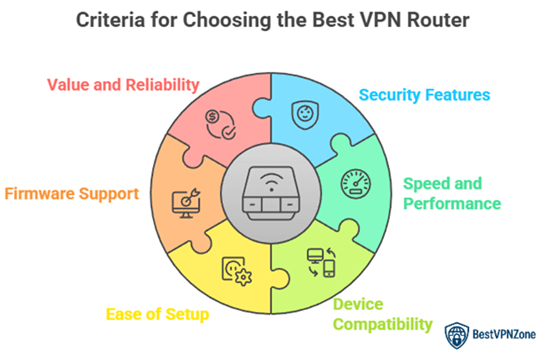
At BestVPNZone, we prioritize credibility by providing accurate, relevant, and objective information through a rigorous editorial process. This exclusive guide to the best VPN routers is based on over 100 hours of hands-on testing across 40 professional-grade and consumer-level devices. VPN routers play a vital role in boosting security for remote work, gaming, and multiple device usage. Our experts deliver in-depth research, pricing comparisons, and comprehensive feature analysis to help you choose secure, high-performing, and optimized solutions. The guide includes both free and paid options to support privacy-conscious users. We focus on the following factors while reviewing a tool based on
- Security Features: We chose based on routers offering AES encryption, secure tunneling, and strong firewall integration.
- Speed and Performance: Our team selected ultra-responsive routers tested for speed consistency during heavy VPN use.
- Device Compatibility: We made sure to shortlist models that work flawlessly with multiple operating systems and devices.
- Ease of Setup: Experts in our team selected routers with hassle-free setup, so you can configure VPN access rapidly.
- Firmware Support: We chose routers offering frequent updates and open-source firmware options for secure customization needs.
- Value and Reliability: The routers selected were optimized for efficiency, saving time and providing consistent VPN performance.
VPN router types
VPN routers come in different types, and choosing the right one depends on your needs. Each type offers different levels of control, ease of use, and compatibility.
Let’s break them down:
- Pre-configured VPN Routers: These come with VPN software already installed. You just plug them in and connect. They’re great for beginners or those who want hassle-free setup. I’ve used one in a home office and found it very practical.
- Flashed Routers: These are standard routers that have been modified with firmware like DD-WRT or Tomato. They allow custom VPN setups and advanced features. Ideal for tech-savvy users who want full control.
- Router with Built-in VPN Support: Some modern routers come with native VPN support in the settings. You don’t need to flash or install anything extra. These offer a balance between ease and flexibility.
- Dual Router Setup: This involves using one router for normal use and another for VPN traffic. It’s great if you want to separate devices or create zones within your network.
Top VPN Routers
Choosing the right VPN router depends on your needs—whether it’s for home use, remote work, or protecting multiple devices. Based on long-term experience and market performance, here are some of the best VPN routers you can rely on.
1) Privacy Hero 2
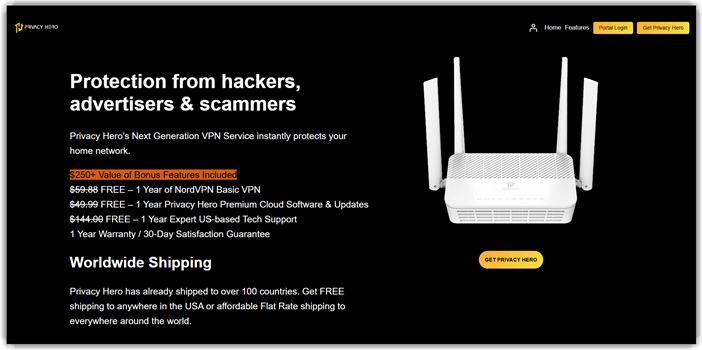
Privacy Hero 2 impressed me with how easily it fits into everyday digital life. During my research, I realized it is one of the most intuitive and top-rated VPN routers for anyone who values privacy. I particularly appreciate how it automatically connects all home devices through NordVPN with just a few clicks. It is important to mention that even those new to VPNs will find setup simple. Businesses often rely on this feature to ensure data protection across multiple devices without additional costs.
Features:
- WiFi 6 AX3000 Performance: Offers dual-band WiFi 6 speeds up to 3000 Mbps, enabling seamless streaming, gaming, and large file transfers with improved efficiency and reduced interference.
- NordLynx WireGuard Optimization: Pre-configured with NordVPN’s NordLynx protocol for lightning-fast, encrypted connections that maintain minimal latency and enhanced privacy protection for all connected devices.
- Whole Home VPN Coverage: Ensures comprehensive VPN protection across all household devices, removing the need for individual installations on phones, laptops, or smart TVs.
- WPA3 Advanced Security: Implements next-generation WPA3 encryption for stronger protection against brute-force attacks and improved network security for sensitive data transfers.
- Automatic VPN Failover: Automatically detects and switches VPN servers when one connection drops, ensuring uninterrupted privacy and consistent online access.
Pros
Cons
Link: https://www.privacyhero.com/
2) ExpressVPN Aircove
ExpressVPN Aircove stood out to me as a remarkable VPN router. During my research, I found that it is one of the most effective and intuitive routers for total home protection. I particularly appreciate how it allows you to connect all your devices to the VPN automatically, saving time and avoiding manual setup. It is important to remember that its Wi-Fi 6 technology keeps your connection fast even with multiple users online. In my opinion, it is the best way to combine privacy and performance.

Features:
- Built-In ExpressVPN Protection: Preinstalled VPN ensures all connected devices are protected automatically without needing separate app installations, providing consistent privacy and encrypted browsing.
- Device Grouping for VPN Control: Allows users to assign specific devices to different VPN locations, letting each device operate under separate virtual IPs for customized access and privacy.
- One-Click VPN Activation: Simple interface allows users to activate or switch VPN servers instantly through an intuitive dashboard accessible on mobile and desktop browsers.
- Split Tunneling Support: Enables users to choose which devices use the VPN and which connect directly, optimizing bandwidth and access to local services.
- Automatic Firmware Updates: Keeps the router up-to-date with the latest security patches and performance enhancements without manual intervention.
Pros
Cons
3) GL.iNET Beryl-AX
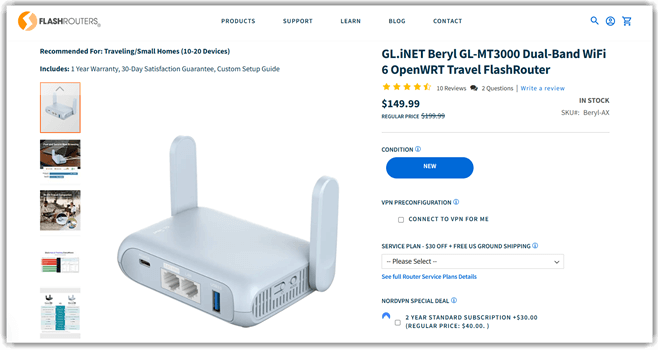
GL.iNET Beryl-AX quickly became one of my top picks after I tested its performance. During my research, I realized that this travel-friendly router is a phenomenal blend of portability and protection. I particularly appreciate how it allows you to create a private, encrypted Wi-Fi network anywhere — from hotels to co-working spaces. It is a great option for frequent travelers who aim to avoid public Wi-Fi risks. Its VPN compatibility and intuitive interface make it one of the most effective choices in the best VPN routers category.
Features:
- OpenWRT Preinstalled Firmware: Comes preloaded with OpenWRT for customizable network management, advanced firewall settings, and third-party package installation for tech-savvy users.
- USB 3.0 and Ethernet Ports: Provides high-speed USB 3.0 and Gigabit Ethernet ports for fast file sharing, NAS setups, and stable wired connections.
- IPv6 Support: Ensures compatibility with modern IP addressing standards, improving routing performance and future-proofing the device for next-generation internet networks.
- Tethering Capability: Supports tethering via smartphones, 4G modems, or public Wi-Fi to create a secure private network on the go.
- AdGuard Home Integration: Built-in AdGuard Home support blocks ads, trackers, and malicious domains directly at the network level for cleaner, faster browsing.
- Easy VPN Management Interface: Features an intuitive dashboard for quick VPN setup, monitoring, and server switching, even for non-technical users.
Pros
Cons
Link: https://www.flashrouters.com/beryl-wifi-6-mt3000-vpn-travel-router-by-flashrouters
Top VPNs
1) ExpressVPN

ExpressVPN impressed me with its intuitive setup and seamless device coverage. During my research, I noticed how effortlessly it connects through routers to secure all connected gadgets. It is a great way to protect your privacy while maintaining high-speed browsing. The interface is user-friendly, and the router compatibility makes it one of the best choices for everyday users. In fact, it helps you stay protected without extra effort. Small businesses often find this feature helpful to ensure all their employees’ devices stay protected on shared networks, boosting security and productivity.
30-Days Money-back Guarantee
2) FastestVPN

FastestVPN offered me a smooth and reliable experience while reviewing its router compatibility. I particularly appreciate its simple installation and lifetime pricing model, which makes it a perfect option for users seeking cost-effective privacy. In my opinion, it is one of the best tools for those who want security without paying recurring fees. It helps you keep your entire home network encrypted in just a few minutes. Case Study: Small business owners usually find this feature helpful to secure internal communications while saving long-term costs with a one-time payment structure.
31-Days Money-back Guarantee
3) Private Internet Access

Private Internet Access (PIA) stood out to me as an excellent and secure VPN router option for both individuals and organizations. Over the course of my evaluation, I was able to confirm that its open-source apps and strong encryption provide one of the easiest ways to ensure network-wide protection. It is helpful to know that its MACE feature blocks malicious ads, enhancing the browsing experience. I personally recommend PIA for users seeking reliability with advanced privacy control. Case Study: IT consultants usually benefit from this feature to manage encrypted connections across clients’ routers, ensuring consistent security and smooth data flow.
30-Days Money-back Guarantee
How To Configure a VPN on Your Router
Setting up a VPN on your router may sound complex, but it’s more straightforward than you think. Once configured, it secures every device connected to your Wi-Fi—without needing to install apps separately. This setup is ideal for homes, remote work, and even small businesses.
Before You Start:
- Make sure your router supports VPN connections (OpenVPN or WireGuard).
- Have your VPN account login and server configuration details ready.
Step-by-Step Guide:
- Log in to your router: Open a browser and enter your router’s IP address (like 192.168.1.1). Log in with your admin credentials.
- Go to VPN settings: Look for a section called “VPN,” “WAN,” or “Advanced.” It varies by router brand.
- Choose VPN type: Select the supported option (usually OpenVPN). Some routers also support L2TP or PPTP.
- Enter VPN details: Upload the VPN config file or manually enter the server address, username, and password.
- Save and apply: Click “Save” and reboot the router if needed.
VPN router setup options
When setting up a VPN router, you have several options depending on your technical comfort, the router model, and the level of control you want. Each setup method has its pros and is suited to different types of users.
1. Built-in VPN Support
Some modern routers come with built-in VPN features. You simply enter your VPN credentials in the settings panel. This method is user-friendly and great for beginners.
2. Pre-Configured VPN Routers
These routers are shipped with the VPN service already set up. Just plug it in and log in to your VPN account. It’s a perfect plug-and-play option, especially if you want fast deployment.
3. Flashing Custom Firmware
Advanced users often prefer installing firmware like DD-WRT or Tomato to gain full control. It supports more VPN protocols and features. But it needs careful setup and may void warranties.
4. Using a Second Router
You can create a dual-router setup—one for VPN, one without. This allows you to choose which devices use VPN, offering more flexibility.
Personally, I recommend starting with a router that supports VPN natively. It keeps setup simple and avoids technical issues for most users.
Why most VPN routers are slow
Many users notice a drop in internet speed after setting up a VPN router. This is not a flaw in the device itself, but rather a result of how VPN technology works behind the scenes.
Key Reasons for Slower Speeds:
- Encryption Overhead: VPN routers encrypt and decrypt your data before it moves across the internet. This process takes extra time and processing power, especially if the router has a weak CPU.
- Distance to VPN Server: If your VPN is connected to a server far from your location, your data has to travel longer. This causes delays, even if your base internet speed is fast.
- Router Hardware Limitations: Entry-level routers are not designed for heavy encryption tasks. I always advise using routers with dual-core or quad-core processors if you’re serious about VPN use.
- Network Congestion: Public VPN servers can get crowded. This leads to slower performance, especially during peak hours.
How to get the fastest speeds with your VPN router
VPN routers are great for privacy, but speed can sometimes drop. The good news is, you can improve performance with a few simple steps. I’ve guided many users through this, and even small changes can make a big difference.
Steps to Boost Speed:
- Choose a Nearby VPN Server: The closer the server, the faster the connection. Select a server that’s in or near your country for better speeds.
- Use a High-Performance Router: Make sure your router has a strong CPU (dual-core or better). Low-end routers can’t handle VPN encryption efficiently.
- Use WireGuard Protocol: If your VPN supports WireGuard, use it. It’s faster and more efficient than older protocols like OpenVPN or PPTP.
- Update Firmware: Keep your router’s firmware and VPN client updated. This improves performance and fixes bugs.
- Avoid Crowded Servers: If one server is slow, switch to another. Many VPN apps show server load percentages.
- Use Ethernet Instead of Wi-Fi: Wired connections are often faster and more stable than wireless.
Conclusion
I have always valued a seamless, private, and secure online experience, especially when it comes to protecting data across multiple devices. Choosing the right VPN router can make a remarkable difference in maintaining consistent performance and privacy. If you are deciding, check my verdict to find out what stands out today.
In this analysis, I focused on real-world performance, speed, and reliability. The first proved secure and stable, the second offered cost-effective customization, and the third provided impressive ease of control. For those seeking an ultimate, reliable solution, I recommend the most popular model that solves connectivity challenges efficiently.