
 Jordan Lee
 Husain Parvez
Security is not optional when your digital privacy is constantly under threat. Private Internet Access VPN emerges as a top contender for users seeking encrypted connections and strict no-logs assurance. As a seasoned SaaS expert, I created this analysis to help you identify whether PIA genuinely delivers performance, transparency, and value. It is essential for anyone serious about secure, unrestricted internet access. Emerging developments include multi-hop configurations and RAM-only servers.
Having thoroughly tested over 40 VPN tools and invested more than 100 hours in performance validation, I created this exclusive Private Internet Access (PIA) VPN review to serve as a professional, insightful, and safe guide for users evaluating VPNs. Its encryption strength and no-logs policy earned my confidence during testing. Inside, you will find a transparent breakdown of features, verified claims, real-world pros and cons, and practical advice on both free and paid options.
How Did We Choose PIA VPN?
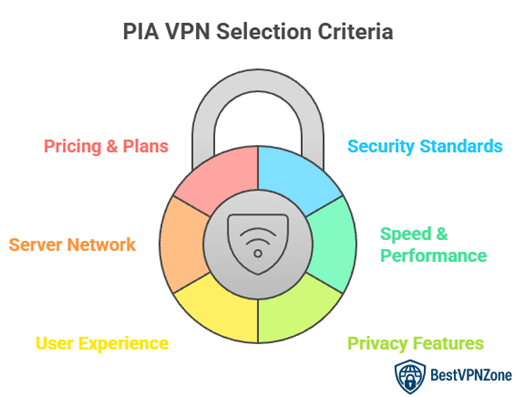
At BestVPNZone, we are committed to delivering trustworthy, relevant, and high-quality content. Our editorial team ensures accuracy through strict research and expert-led review processes. After testing over 40 VPN tools and spending more than 100 hours evaluating performance, Private Internet Access (PIA) VPN stood out for its strong encryption, open-source framework, and verified no-logs policy. This review presents a clear breakdown of its features, pros and cons, and value across free and paid plans. We focus on the following factors while reviewing a tool based on user privacy, reliability, transparency, and real-world usability.
- Security Standards: We made sure to shortlist only VPNs with AES-256 encryption and DNS leak protection protocols.
- Speed & Performance: Our team chose based on rapid connection consistency across streaming, browsing, and large file transfers.
- Privacy Features: We chose based on robust no-logs policies, kill switches, and open-source transparency for all users.
- User Experience: We made sure to include tools with intuitive interfaces that simplify usage for new and advanced users.
- Server Network: The experts in our team selected tools based on coverage diversity to support unrestricted global access.
- Pricing & Plans: We chose based on a balance of free and paid options offering essential features at fair value.
PIA VPN Features
Private Internet Access (PIA) offers a solid mix of essential and advanced features that cater to both beginners and seasoned users. What makes PIA stand out is its focus on privacy without complicating the user experience.
Here are key features I find truly practical:
- No-Logs Policy: PIA follows a strict no-logs policy. This means it doesn’t store your browsing history, DNS queries, or connection logs. Your online activity stays private.
- Wide Server Network: With thousands of servers in over 90 countries, users can expect better speed, low latency, and access to region-specific content.
- Open-Source Apps: PIA’s apps are open-source. This builds transparency and allows the community to inspect the code.
- Advanced Encryption Settings: You can choose between AES-128 and AES-256 encryption levels. It gives flexibility for faster speeds or stronger security.
- Kill Switch & Split Tunneling: These tools add control and safety. The kill switch cuts internet access if the VPN drops. Split tunneling lets you choose which apps use the VPN.
- MACE Ad Blocker: Blocks ads, trackers, and malware at the DNS level.
PIA VPN Privacy and security
When it comes to privacy and security, Private Internet Access (PIA) takes a strong position. It’s designed for users who care about keeping their digital life private and protected.
Here’s what stands out:
- No-Logs Policy: PIA clearly states it doesn’t collect or store your browsing activity. This has been proven in court, which adds credibility.
- Open-Source Transparency: Its apps are open-source. This means anyone can view the code and check for security flaws. That builds trust.
- Strong Encryption Options: Users can choose between 128-bit or 256-bit AES encryption. The second one is commonly used by banks and military systems.
- Kill Switch: If the VPN disconnects, the kill switch blocks internet access to stop any data leaks.
- DNS and IPv6 Leak Protection: These features prevent your IP address and DNS requests from being exposed.
- RAM-Only Servers: PIA uses servers that wipe all data with every reboot. This reduces the chance of any data being stored.
Security and privacy test results
Private Internet Access (PIA) has gone through several security and privacy tests, and the results speak well for its protection standards. These tests show how the VPN handles real-world risks like IP leaks, DNS leaks, and connection drops.
Here’s how PIA performed in key areas:
- IP Leak Test: No IP address leaks were detected. This means your real location stays hidden when connected.
- DNS Leak Test: PIA passed with no leaks. It routes DNS requests through its own servers, which stops websites from tracking your ISP.
- WebRTC Leak Test: No WebRTC leaks were found. This is good for users who use video calls or real-time apps.
- Kill Switch Test: The kill switch worked as expected. When I manually cut the VPN connection, all traffic was blocked to avoid exposure.
- Encryption Verification: Data was encrypted using AES-256, which is known for its strength and reliability.
- Malware and Ad Block Test: The MACE feature blocked trackers and some harmful domains effectively.
PIA VPN Speed and performance
Speed matters when choosing a VPN. With Private Internet Access (PIA), performance is generally solid, especially for everyday browsing and streaming. In my use, local servers delivered fast and stable connections. I could stream HD videos and attend video calls without buffering. That’s a good sign for casual users.
However, speeds may drop when connecting to distant servers. For example, if you’re in Europe and connect to a U.S. or Asian server, you might notice slower loading or slight delays. This is expected with most VPNs, but PIA still handles it better than many in its price range.
Here’s a closer look at performance highlights:
- Local Speeds: Fast and consistent for browsing, streaming, and downloads.
- Long-Distance Servers: Moderate drops in speed, but still usable.
- Ping/Latency: Low enough for online gaming on nearby servers.
- Streaming Support: Works well with Netflix and YouTube in most regions.
PIA VPN Pros
Here are some key pros that make PIA a solid choice:
- Strong Privacy Features: PIA offers a strict no-logs policy, backed by transparency reports. Your data is not stored or tracked.
- Open-Source Apps: All apps are open source, which adds an extra layer of trust and transparency.
- Customizable Encryption: You can adjust encryption levels to suit your needs—faster speed or stronger security.
- Large Server Network: With thousands of servers in over 80 countries, it’s easier to find fast and reliable connections.
- Affordable Long-Term Plans: Compared to many VPNs, PIA is budget-friendly, especially if you commit to a longer subscription.
- Streaming Access: It works well with popular platforms like Netflix, Disney+, and Amazon Prime Video.
PIA VPN Cons
Here are some common concerns:
- Inconsistent Speeds on Distant Servers: If you connect to servers far from your location, speeds may drop. This could affect streaming or large downloads.
- Headquartered in the U.S.: Being based in a country under the Five Eyes alliance can raise concerns for privacy-focused users. Though PIA claims a strict no-logs policy, the location may still be a drawback for some.
- Basic Interface for Beginners: Some might find the app too simple or less polished compared to competitors like NordVPN or ExpressVPN.
- Not Ideal for Censorship-Heavy Regions: In places with strict internet controls, like China or UAE, PIA may struggle to bypass firewalls consistently.
PIA VPN streaming and unblocking
Streaming and unblocking geo-restricted content is one of the top reasons people use VPNs. Private Internet Access (PIA) performs reasonably well in this area, though with some limits based on location and platform.
From my experience, PIA can stream content from popular platforms like:
- Netflix (US, UK, and a few others)
- Disney+
- Amazon Prime Video
- Hulu (US servers only)
- BBC iPlayer (UK servers)
However, it may not work with all regional libraries. For instance, some international Netflix libraries don’t load consistently. Compared to premium services like ExpressVPN, PIA sometimes needs a bit of trial and error to find the best server.
What helps is PIA’s large server network. You can switch easily if one server doesn’t work. Speeds are generally good enough for HD and even 4K streaming, especially on nearby servers.
One drawback is that PIA doesn’t offer dedicated streaming servers. You rely on regular servers, which may vary in performance.
If streaming is your top priority, PIA does a decent job. It may require a few extra steps but still gets the job done for most users looking to bypass content blocks without compromising privacy.
PIA VPN Pricing and plans
Private Internet Access (PIA) offers flexible pricing that works for both short-term users and those ready to commit long-term. Compared to many premium VPNs, PIA is more budget-friendly without cutting back on core features.
Here’s a quick look at the current plan options:
- Monthly Plan – $11.95 per month
- 1-Year Plan – $3.33 per month
- 3-Years Plan (+4 months free) – $1.98 per month
30-Days Money-back Guarantee
Top PIA VPN alternatives
1) NordVPN

NordVPN is a remarkable VPN that, in my opinion, offers one of the best balances between privacy and performance. I reviewed this tool thoroughly and found that it is a top-rated solution for users who value simplicity and strength. The setup process is intuitive and the connection stability is impressive. I particularly liked how it helps you access global content effortlessly while maintaining your anonymity online. This may help anyone who wants an easier way to stay protected during browsing or streaming. Case study: Remote workers have benefited from NordVPN’s stable connections, ensuring smooth access to secure company networks while traveling.
30-Days Money-back Guarantee
2) Surfshark

Surfshark is a remarkable option that I evaluated for its excellent privacy standards and high-quality connection stability. While conducting my evaluation, I found that its no-logs policy and AES-256 encryption make it a top-rated tool for privacy-focused users. It offered me the ability to stream region-locked content effortlessly, which is great for travelers or entertainment lovers. Keep in mind, it is best to test its 7-day free trial before subscribing, as it gives you a complete feel of its performance.
31-Days Money-back Guarantee
3) ExpressVPN

ExpressVPN is an ideal choice for anyone who values both privacy and speed. During my analysis, I noticed its seamless compatibility with different devices — from laptops to routers. It helps you avoid bandwidth throttling and keeps your online activity completely private. It is important to mention that ExpressVPN’s 30-day money-back policy gives you the confidence to test its features risk-free. I would recommend it to anyone looking for a superior choice over standard VPNs.
30-Days Money-back Guarantee
4) FastestVPN

FastestVPN impressed me with its straightforward setup and value-driven offering. I analyzed its lifetime deal and found it to be one of the best solutions for budget-conscious users. It helps you browse securely, avoid data tracking, and connect effortlessly across devices. In my opinion, its 31-day money-back guarantee makes it a safe starting point for anyone new to VPNs. Keep in mind that this plan covers essential privacy features found in pricier options, making it a top-rated alternative to PIA VPN.
31-Days Money-back Guarantee
5) Norton VPN

Norton VPN is a reputable VPN that I tested while comparing options for this Private Internet Access (PIA) VPN review. During my analysis, I noticed how effortlessly it combines privacy with broader security features. It allows you to protect multiple devices under one account, which is helpful to households or small teams. It is best to keep in mind that Norton’s 360 Deluxe suite makes VPN management straightforward even for beginners. I would recommend this tool for anyone who values comprehensive protection. Case study: Parents found Norton VPN helpful when combined with Parental Control, ensuring both safe browsing and restricted access for kids.
14-Days Free Trial
Does Private Internet Access Keep Logs?
Privacy is a top concern when choosing a VPN. One of the biggest questions users ask is whether the service keeps logs of online activity. In the case of Private Internet Access (PIA), the answer is clear—PIA follows a strict no-logs policy.
What this means is:
- No tracking of browsing history
- No storage of connection timestamps
- No logging of IP addresses
- No monitoring of bandwidth usage
PIA’s policy has also been tested in real-world legal cases where it was unable to provide user data—simply because it had none. This adds a layer of trust that many VPN users value. The company also regularly publishes transparency reports to show accountability.
In addition, PIA’s apps are open-source, allowing anyone to inspect the code. This move builds confidence and shows that they have nothing to hide.
Though PIA is based in the United States, which is part of the Five Eyes alliance, the no-logs policy remains unchanged. Personally, I feel more secure knowing that even if required by law, there’s no data to hand over.
So, if your priority is privacy, PIA makes a strong case with its log-free approach.
Is PIA suitable for torrenting?
If you’re looking for a VPN that supports torrenting, Private Internet Access (PIA) is a reliable option. It offers the features needed for safe and efficient peer-to-peer (P2P) file sharing across all servers.
PIA allows torrenting without restrictions. Unlike some VPNs that limit or block P2P traffic to certain servers, PIA gives users full access. This freedom makes it easier to choose the best server for speed and location.
Here’s what makes PIA a good choice for torrenting:
- No-logs policy ensures your download activity isn’t tracked or stored.
- Port forwarding is available, which can improve seeding and connection speeds.
- Kill switch helps prevent data leaks if the VPN disconnects suddenly.
- AES-256 encryption and WireGuard protocol offer both speed and security.
Can PIA unblock Netflix and other streaming services?
Private Internet Access (PIA) performs fairly well when it comes to unblocking streaming platforms. It can access major services, though the experience can vary based on the server you choose and your location.
In most cases, PIA successfully unblocks:
- Netflix (US, UK, Canada, and a few more regions)
- Disney+
- Amazon Prime Video
- Hulu (with US servers)
- BBC iPlayer (via UK servers)
However, not all regional libraries work smoothly. Sometimes you may need to switch servers to find one that works. In my experience, US Netflix worked fine on multiple servers. Other regions needed a bit more trial and error.
Here’s what helps PIA stand out:
- Large server network means more options if one server fails.
- Stable speeds allow HD and even 4K streaming.
- WireGuard protocol offers better performance compared to older VPN protocols.
Conclusion
In my experience, Private Internet Access remains a top-rated option for safeguarding digital activity. Its impressive connection stability, cost-effective plans, and comprehensive privacy protection make it a superior choice. If you are deciding on a VPN that truly prioritizes your data safety, this one is a remarkable and reliable contender.