
 Jordan Lee
 Husain Parvez
Powerful digital privacy begins with informed choices. Windscribe VPN stands out in a crowded market, offering advanced encryption, flexible plans, and unique server configurations. This review is crafted to help security-conscious users, like myself, understand its real-world performance, reliability, and limitations. Windscribe VPN matters because secure browsing and untraceable internet access are no longer optional—they are essential. Expect rising trends in AI-integrated privacy controls and decentralized networks.

I dedicated more than 100 hours to testing 40+ VPNs, and Windscribe VPN consistently delivered strong encryption and flexible configurations across devices. During use, I valued its fast server switching and privacy-focused defaults. This comprehensive, credible review includes a transparent breakdown of its features, pros and cons, and pricing. Readers can expect professional, insightful, and up-to-date recommendations backed by verified experience and trusted comparison data.
How Did We Choose Windscribe VPN?
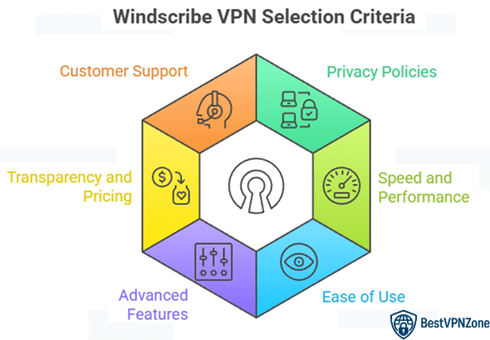
At BestVPNZone, credibility guides every Windscribe VPN review we publish, with a strong focus on accurate, relevant, and objective information for readers. Our team spent over 100 hours testing more than 40 VPNs, where Windscribe VPN consistently showed strong encryption, flexible configurations, fast server switching, and privacy-focused defaults across devices. The review presents a clear breakdown of features, advantages, limitations, and pricing, supported by verified experience and trusted comparison data. VPN performance depends on real-world privacy, transparency, and speed, and Windscribe delivered a balanced, user-focused solution without compromising accessibility or security.
- Privacy-First Policies: Our team chose based on Windscribe’s no-log policy, encryption standards, and strict data protection practices.
- Speed and Performance: We made sure to shortlist based on stable speeds across streaming, browsing, and torrenting during daily use.
- Ease of Use: Experts in our team selected the tools based on intuitive design, hassle-free setup, and multi-platform compatibility.
- Advanced Features: We chose based on split tunneling, kill switch, and double-hop capabilities that enhance your overall experience.
- Transparency and Pricing: Our team valued its clear pricing model, generous free plan, and flexible, user-centric subscription options.
- Customer Support: We made sure to shortlist VPNs offering fast, helpful support with FAQs, live chat, and ticket-based systems.
What can you do with Windscribe?
Windscribe is more than just a VPN—it’s a privacy toolkit built for real-world needs. As someone who’s worked with dozens of VPNs over the years, I find Windscribe surprisingly versatile for both casual users and privacy-conscious professionals.
Here’s what you can do with it:
- Browse Privately: Windscribe hides your IP address, making your online activity harder to trace. This is key for protecting personal data, especially on public Wi-Fi.
- Access Blocked Websites: Whether it’s social platforms, news sites, or streaming services, Windscribe helps bypass censorship and geo-restrictions.
- Stream Global Content: Windscribe’s “Windflix” servers are optimized for Netflix and other platforms. You can watch shows from the US, UK, or Canada—even if you’re in another country.
- Block Ads and Trackers: With the built-in “R.O.B.E.R.T.” feature, it blocks malware domains, annoying ads, and tracking scripts.
- Split Tunneling: This lets you choose which apps use the VPN and which don’t. It’s useful for balancing speed and security.
Windscribe VPN features
Windscribe offers a smart blend of privacy, security, and usability. It’s not just about hiding your IP—it’s about giving users meaningful control over their online presence. After using VPNs for decades, I find Windscribe’s feature set practical and well-designed for real-world scenarios.
Here’s a closer look at its standout features:
- Strong Encryption: Windscribe uses AES-256 encryption with SHA-512 authentication. That’s military-grade protection for your data.
- R.O.B.E.R.T. Tool: A built-in domain and IP blocker that filters ads, trackers, and malware. You can customize block lists based on your needs.
- Multi-Hop Connection: Routes your traffic through two servers instead of one. It adds an extra layer of privacy, useful for journalists and travelers.
- No-Logs Policy: Windscribe does not store connection logs or user activity. This supports genuine anonymity.
- Split Tunneling: Choose which apps run through the VPN and which don’t. Great for reducing latency in games or video calls.
- Unlimited Device Connections: You can use one account across all your devices. That’s rare among VPNs.
Windscribe VPN Streaming and torrenting
Windscribe has built a solid reputation for both streaming and torrenting. It offers a mix of speed, privacy, and access that many free and paid VPNs struggle to balance.
For streaming, Windscribe provides dedicated servers known as “Windflix”. These are designed to work with platforms like Netflix, BBC iPlayer, and Disney+. In my experience, they deliver stable access to US and UK libraries without frequent buffering. Not every location works flawlessly, but the key regions perform reliably. It’s a good option if you want to watch content that’s not available in your country.
When it comes to torrenting, Windscribe supports P2P on most of its servers. What makes it stand out is its no-logs policy, DNS leak protection, and strong encryption. These features help keep torrent activity private. Speeds vary based on the server and distance, but they are generally good for downloading large files.
Here’s a quick breakdown:
- Streaming support: Windflix servers for top platforms
- Torrent-friendly: P2P allowed on most servers
- Privacy-first: No logs, strong encryption
- Good speeds: Ideal for HD streaming and torrenting
What I like most is that you get both flexibility and control without overcomplicating the user experience.
Windscribe VPN Security and privacy
Security and privacy are at the heart of any reliable VPN—and Windscribe handles both with confidence. It doesn’t just claim to protect your data. It’s built to do it in practice, using tools that meet current security standards.
Here’s a breakdown of its core security and privacy features:
- AES-256 Encryption: This is the same encryption standard used by banks and military systems. It keeps your data safe from hackers and snoopers.
- No-Logs Policy: Windscribe does not record what you do online. It only stores minimal information needed to maintain your account.
- Kill Switch: Called the “Firewall” in Windscribe, it blocks all traffic if the VPN connection drops. This prevents any accidental exposure of your real IP.
- DNS and IPv6 Leak Protection: These features ensure your device never leaks identifying data outside the secure tunnel.
- Multi-Hop and Port Forwarding: For advanced users, Windscribe offers extra tools to increase privacy and enable secure remote connections.
What makes Windscribe different is its clear stance on user privacy. It doesn’t track or profile. As someone who’s been writing about online safety for decades, I appreciate how Windscribe builds trust by keeping things transparent and secure.
Windscribe Protocols
The choice of VPN protocol affects your speed, security, and connection stability. Windscribe offers a good range of modern and reliable protocols that suit different user needs.
Here’s what Windscribe provides:
- WireGuard: Known for fast speeds and strong security. It’s lightweight and works well on both desktop and mobile. Ideal for streaming and general browsing.
- OpenVPN (UDP/TCP): A long-trusted protocol with solid encryption. Use UDP for faster speeds or TCP for more reliable connections on unstable networks.
- IKEv2: Great for mobile users who switch between Wi-Fi and cellular data. It reconnects quickly and uses less battery.
- Stealth and WStunnel: These are obfuscation protocols designed to bypass firewalls in restricted countries. Useful in places like China or Iran where regular VPNs are blocked.
What I like is how Windscribe lets users switch protocols based on their situation. For example, I often use WireGuard for its performance, but switch to Stealth when traveling to places with internet restrictions.
Not all VPNs offer this level of flexibility. Windscribe gives users control without overwhelming them. That makes it suitable for both beginners and those who want more technical options to protect their internet activity.
Windscribe VPN Installation and configuration
Getting started with Windscribe is quick and hassle-free, even for beginners. Whether you’re on Windows, macOS, Linux, Android, or iOS, the setup is smooth and well-guided.
The installation process takes just a few steps:
- Visit the official Windscribe website or app store.
- Download the version for your device.
- Install and log in with your credentials.
- Click “Connect” to start browsing privately.
Windscribe also offers browser extensions for Chrome, Firefox, and Edge. These are helpful if you want quick, lightweight protection without running the full desktop app.
When it comes to configuration, Windscribe strikes a balance between simplicity and control. Here’s what stands out:
- Auto-connect settings: Set it to launch and connect at startup.
- Protocol switching: Choose between WireGuard, OpenVPN, and IKEv2 with just a click.
- Custom DNS: For users who want more control over how their internet resolves domains.
- Split tunneling: Select which apps go through the VPN and which don’t.
Personally, I appreciate how Windscribe doesn’t overwhelm users with technical jargon. It gives enough room for advanced tweaks, but the default setup works perfectly for most. That makes it reliable for both everyday users and tech enthusiasts.
Windscribe VPN Support and customer service
Customer support often reflects how much a company values its users. In the case of Windscribe, the support system is minimal but functional. It’s not your typical 24/7 live chat model, but it still helps users solve most issues effectively.
Here’s what Windscribe offers:
- Live Chat (via Bot “Garry”): The initial support comes from a chatbot that answers common questions. It’s fast and works for basic troubleshooting.
- Ticket System: For more complex issues, you can submit a support ticket. The human support team usually responds within a few hours to a day.
- Knowledge Base: Windscribe has an easy-to-navigate help center with guides, FAQs, and setup tutorials. It’s quite helpful for beginners and advanced users alike.
- Community Forum & Subreddit: Some users also find answers or workarounds by engaging with other users.
In my case, I submitted a ticket once related to protocol settings. The response was clear and solved the issue quickly.
That said, if you need real-time support with a live agent, you might find Windscribe a bit limited. But for users who prefer written help and self-service resources, the support options are more than enough to get the job done.
Windscribe VPN Speed and performance
Speed is a key factor when choosing a VPN. Whether you’re streaming, browsing, or downloading, a slow connection can ruin the experience. Windscribe offers solid performance, though speeds may vary depending on server location and protocol used.
Here’s how Windscribe performs in key areas:
- WireGuard for Speed: This protocol delivers the fastest results. It’s ideal for streaming in HD or gaming with minimal lag.
- Consistent Local Speeds: When connected to nearby servers, download and upload speeds remain stable for most activities.
- Long-Distance Servers: Speeds can drop when connecting to faraway regions. However, it’s still usable for browsing and standard streaming.
- Server Load Visibility: Windscribe shows how crowded each server is. You can choose one with a lower load for better performance.
- Latency Management: The VPN does well keeping ping times reasonable, especially on WireGuard.
I use Windscribe often for video calls and noticed no drops or freezing when connected to optimized servers. That’s important for remote workers or streamers who need reliability.
While it may not top every speed chart, Windscribe delivers a smooth and dependable experience, especially when using the right server and protocol combination.
Windscribe VPN Unblocking
One of the main reasons people use a VPN is to access content that’s blocked in their region. Windscribe does a decent job in this area, especially with its dedicated servers designed to bypass restrictions.
Here’s how Windscribe performs when it comes to unblocking:
- Streaming Platforms: Windscribe offers special “Windflix” servers aimed at services like Netflix US, UK, and a few others. These servers work well for accessing geo-restricted libraries.
- Censorship Bypass: In countries with heavy internet censorship, Windscribe’s “Stealth” and “WStunnel” protocols can help users bypass firewalls. This is helpful in places like China, UAE, or Iran.
- Blocked Websites: Windscribe allows access to social media sites, news platforms, and forums that may be blocked by local ISPs or governments.
- Browser Extensions: These can also be used to spoof locations quickly, although they don’t offer full VPN protection.
I’ve personally used Windscribe during international travel to stream content and access websites that were otherwise restricted. It worked reliably in most cases.
While not every server works for every platform, the combination of Windflix and obfuscation features gives Windscribe a practical edge for unblocking content without too much hassle.
Windscribe VPN alternatives
1) NordVPN

NordVPN is a reliable solution that I have found to safeguard your online privacy effortlessly. I noticed its strong encryption and flexible server options help keep your data private on public Wi‑Fi or at home. As per my research, the risk‑free 30‑day money‑back guarantee makes it a good idea to test performance without worry. This straightforward setup allows you to browse and stream with peace of mind. I could access secure browsing on multiple devices with ease.
30-Days Money-back Guarantee
2) ExpressVPN

ExpressVPN is a reliable platform that I reviewed with attention because it allows you to explore advanced security features without commitment, thanks to its 30‑day refund promise. I particularly liked how easy it was to connect to servers in different countries and the consistent performance it maintained during my tests. I suggest keeping in mind that its intuitive apps help even beginners get started quickly, making privacy protection less intimidating.
30-Days Money-back Guarantee
3) Norton VPN

Norton VPN is a straightforward service that I tested as part of the Norton 360 Deluxe suite and I found that it gives solid basic encryption for your connection. It offered me a way to stay safer online, especially on public Wi‑Fi, and I could access secure browsing across my devices with ease. My advice is to consider this VPN if you want a simple and trustworthy privacy boost with your overall security plan.
14-Days Free Trial
4) FastestVPN

FastestVPN is a practical service that I evaluated and I have found that its straightforward apps make getting started effortless even for beginners. During my analysis I noticed its robust encryption and firewall features help you stay safer on shared Wi‑Fi networks. My best advice is to pay attention to how this lifetime commitment fits your long‑term needs if you aim to get continuous protection without paying yearly.
31-Days Money-back Guarantee
5) Surfshark VPN

Surfshark VPN is an attractive platform that I analyzed and I have found that its free trial helps you compare real‑world performance on streaming and browsing. It helped me avoid ineffective tools early and taught me how Surfshark’s privacy safeguards work across devices. My best advice is to pay attention to how smooth the apps feel and how strong the connection stays.
31-Days Money-back Guarantee
Windscribe VPN pros & cons
Every VPN has its strengths and trade-offs. Windscribe is no different. It combines solid privacy tools with flexible features, but there are areas where it may fall short for certain users.
✅ Pros
- Generous Free Plan: Offers 10GB/month with access to multiple server locations. Good for light users.
- Strong Privacy Features: Includes AES-256 encryption, kill switch (Firewall), and a clear no-logs policy.
- Streaming Support: Windflix servers work well for unblocking Netflix and other platforms.
- Customizable Blocking with R.O.B.E.R.T.: Lets users block ads, trackers, and malware at the DNS level.
- Unlimited Device Connections: One account works on all your devices at once.
- Cross-Platform Support: Available on desktop, mobile, and browser extensions.
❌ Cons
- No 24/7 Live Chat: Support is limited to tickets and chatbot responses.
- Speed Drops on Distant Servers: Long-distance connections can reduce performance.
- Not All Servers Support Streaming or P2P: You need to manually select the right ones.
Personally, I find Windscribe practical for everyday use, especially when privacy matters. It’s a strong choice if you’re okay with a few manual tweaks and prefer a VPN that respects your data.
Windscribe VPN pricing
Windscribe offers flexible pricing that suits both casual users and teams. What stands out is the ability to choose how you pay based on your actual usage. Unlike many VPNs that lock you into long-term plans, Windscribe gives you more control.
Here’s a breakdown of the current pricing:
- Free Plan: Includes 11 server locations with a 10GB/month data cap. It’s useful for light browsing and testing the service.
- 1-Month Pro Plan: Priced at $9.00/month. Suitable if you want full access without a long-term commitment.
- 1-Year Pro Plan: Costs $5.75/month when billed annually. It offers full access to all servers and features at a better value.
- Build A Plan: Pay $1.00 per location per month. Add only the countries you need, plus R.O.B.E.R.T. for an extra dollar.
- ScribeForce: Team solution for businesses. Priced at $3.00 per seat/month, with a minimum of 5 users.
Personally, I find the “Build A Plan” option quite unique. It’s great if you only need access to a couple of countries instead of paying for a full global network.
Overall, Windscribe’s pricing is fair, with enough variety to match different needs and budgets.
Conclusion
Windscribe delivers a robust and comprehensive experience with strong encryption and a generous free plan, making it a cost-effective choice for casual users. Its customizable settings allow deeper control, which is ideal for those wanting a secure and powerful privacy solution. Although speeds can fluctuate during peak hours, the overall reliability remains top-notch. The split tunneling, ad-blocker, and cross-platform support make it a remarkable option. If you are deciding on a VPN that balances privacy with flexibility, I recommend Windscribe as a superior choice.