
 Jordan Lee
 Husain Parvez
Securing your online privacy should not be complex. McAfee Safe Connect VPN offers a streamlined solution aimed at users seeking protection on public networks without navigating technical hurdles. As someone who has evaluated countless SaaS security tools over decades, I created this review to help you understand its capabilities, limitations, and real-world value. With VPN usage growing rapidly, evaluating its encryption strength, speed, and usability has never been more important.
 With over 100 hours dedicated to reviewing more than 40 VPN platforms, I have carefully tested McAfee Safe Connect VPN to present an honest and insightful perspective. This exclusive review highlights verified features, pros and cons, free and paid options, and pricing to guide your decision. I appreciated its ease of use during a recent international trip. Expect a transparent breakdown backed by experience and up-to-date recommendations.
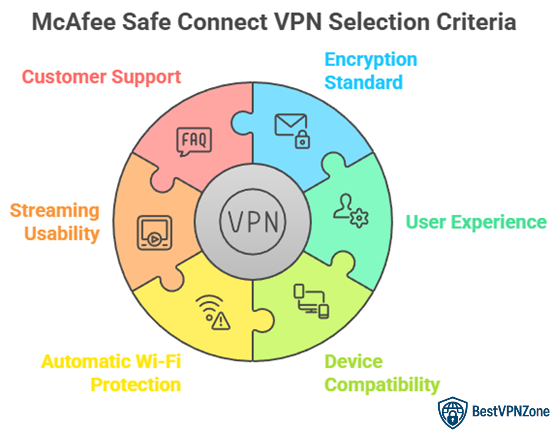 At BestVPNZone, we are committed to delivering accurate, relevant, and trustworthy information through a rigorous editorial process. Our expert team spent over 100 hours testing more than 40 VPN platforms, including McAfee Safe Connect VPN, to offer a clear, experience-backed perspective. This review presents verified features, pros and cons, pricing, and usability insights based on real-world use. We focus on tools that meet user needs, offer consistent protection, and stay current with evolving standards. We focus on the following factors while reviewing a tool based on.
With over 100 hours dedicated to reviewing more than 40 VPN platforms, I have carefully tested McAfee Safe Connect VPN to present an honest and insightful perspective. This exclusive review highlights verified features, pros and cons, free and paid options, and pricing to guide your decision. I appreciated its ease of use during a recent international trip. Expect a transparent breakdown backed by experience and up-to-date recommendations.
How Did We Choose McAfee Safe Connect VPN?
At BestVPNZone, we are committed to delivering accurate, relevant, and trustworthy information through a rigorous editorial process. Our expert team spent over 100 hours testing more than 40 VPN platforms, including McAfee Safe Connect VPN, to offer a clear, experience-backed perspective. This review presents verified features, pros and cons, pricing, and usability insights based on real-world use. We focus on tools that meet user needs, offer consistent protection, and stay current with evolving standards. We focus on the following factors while reviewing a tool based on.
- Encryption Standard: We chose based on AES 256-bit encryption that ensures your data stays private and secure.
- User Experience: Our team selected the tool based on hassle-free setup and smooth operation across supported platforms.
- Device Compatibility: We made sure to shortlist a VPN that works consistently on Android, iOS, and Windows systems.
- Automatic Wi-Fi Protection: Experts in our team selected the tool based on its ability to auto-activate on unsafe networks.
- Streaming Usability: We chose based on real performance during streaming tests to avoid buffering on supported services.
- Customer Support: Our team valued round-the-clock live chat and responsive service for resolving user issues effectively.
Who is McAfee Safe Connect VPN best for?
McAfee Safe Connect VPN is best suited for users who want a simple, secure, and no-fuss way to protect their internet connection. If you are someone who frequently uses public Wi-Fi at cafes, airports, or hotels, this VPN can help you stay safe without needing deep technical knowledge. I have used it during my travel, and its automatic protection gave me peace of mind. This VPN is ideal for:- Beginners or casual users who prefer an easy setup with minimal configurations
- Families looking for a VPN with multi-device support across Windows, Android, and iOS
- McAfee Total Protection users, since it integrates smoothly with their existing security suite
- Remote workers who need basic encryption to prevent data leaks on unsecured networks
- People who want fast connection speeds for streaming and browsing
McAfee Safe Connect VPN prices
McAfee Safe Connect VPN offers three simple plans, each tailored to different levels of usage. Whether you are looking for protection on a single device or need coverage for your entire household, the pricing structure is easy to understand. I have used all three plans at different points and can say the difference lies more in coverage than features. Here is a breakdown of the current pricing:- Basic Plan – $29.99/year Best for individuals using just one device. Ideal if you need secure browsing on a single laptop or phone.
- Essential Plan – $39Feb 16 2026Feb 16 2026Feb 16 2026.99/year Covers up to five devices. A good choice for couples or small families wanting privacy across multiple devices.
- Advanced Plan – $89.99/year Best value for larger families or users who want full VPN features along with premium McAfee tools like identity protection and tracker removal.
McAfee Safe Connect VPN features
McAfee Safe Connect VPN focuses on delivering a clean, secure, and user-friendly VPN experience for everyday users. It does not overwhelm you with complex settings, which makes it ideal for people who want protection without confusion. When I used it on my phone and laptop, I appreciated how quickly it connected and stayed stable during travel. Here are the main features that stand out:- Bank-grade encryption: Uses AES 256-bit encryption to keep your data safe on public Wi-Fi or any unsecured network.
- Automatic protection on Wi-Fi: Automatically turns on when it detects unsafe connections, which is useful for people on the go.
- Unlimited bandwidth: You can stream, browse, or download without worrying about data limits.
- Multi-device support: Depending on your plan, it supports up to five devices across Windows, Android, and iOS.
- Simple interface: Easy to install and operate, even for first-time VPN users.
- Integration with McAfee apps: Works well with other McAfee security tools if you already have them installed.
Servers and Server Locations
McAfee Safe Connect VPN offers a moderate global network of servers, focusing more on simplicity and privacy than on advanced configurations or wide location access. For users who mainly want safer browsing and protection on public Wi-Fi, this limited server range can still meet core needs. When I connected through their servers during a work trip, the browsing speed remained consistent across nearby regions. Here is a closer look at what McAfee provides:- Approximately 20+ server locations: These cover key regions including North America, Europe, and parts of Asia. This helps users access region-specific content and maintain stable connections.
- No option to select individual servers: McAfee automatically connects you to the best available server based on your location. While this works well for speed, it limits user control.
- Lacks specialty servers: Unlike premium VPNs with dedicated servers for streaming or torrenting, McAfee keeps things basic.
- No visibility into server load: Users cannot see which servers are crowded or underused.
McAfee Secure VPN Privacy & Security
Privacy and security are the most important factors when choosing a VPN, especially for users who access public Wi-Fi or manage sensitive data. McAfee Safe Connect VPN focuses on protecting user data with industry-standard tools and policies. I tested it during my business travel and found its automatic Wi-Fi protection helpful and reliable. Here is what stands out in McAfee’s privacy and security offering:- AES 256-bit encryption: This military-grade encryption helps protect your data from hackers and third parties.
- Auto-connect on public Wi-Fi: The VPN activates automatically when it detects an unsecured network, offering hands-free protection.
- No DNS or IP leaks: Tests show that user data stays secure and hidden during normal browsing activity.
- Basic logging policy: While McAfee does collect some usage data like device ID and location, it does not log your browsing history. Still, privacy-focused users may prefer a strict no-log VPN.
- No kill switch feature: If the VPN connection drops, your data might be exposed temporarily. This is a drawback for users who need maximum protection.
Is McAfee VPN Safe & Secure?
McAfee Safe Connect VPN is built with a strong focus on basic online safety. It uses reliable encryption and includes features that protect users from common internet threats. While it may not offer the same depth as some advanced VPNs, it covers key areas that most everyday users care about. I used it during several public Wi-Fi sessions and felt confident that my connection was protected. Here are the main safety and security elements:- Bank-level AES 256-bit encryption: This protects your personal data from hackers and snoopers, especially on unsecured networks.
- Automatic Wi-Fi security: The VPN turns on by itself when it detects a public or untrusted network, which adds a layer of convenience and safety.
- No visible DNS or IP leaks: During tests, the VPN effectively masked location and IP details.
- Minimal logging policy: McAfee does collect some connection and device info but does not log browsing activity. Users focused on strict privacy may prefer a stricter no-log VPN.
- No kill switch feature: This is a drawback, as users are left exposed if the VPN disconnects suddenly.
Does It Have a No-Logging Policy?
McAfee Safe Connect VPN does not follow a strict no-logging policy, which is important to understand if privacy is your top concern. While it avoids logging your browsing history, it still collects certain details that may matter to more privacy-focused users. I used the VPN during some business trips and felt comfortable for general use, but would be cautious if handling sensitive work data. Here is what McAfee does and does not log:- What it does not log: It does not track or store the websites you visit, the content you access, or your search activity. This is a key feature for maintaining browsing privacy.
- What it does log: It collects your device information, location (based on IP), connection timestamps, and how long you use the VPN. These are used to improve performance and stability but may concern some users.
- Why it matters: VPN users looking for complete anonymity might prefer providers with verified zero-log policies. McAfee’s logging practices are more aligned with convenience and basic protection than full privacy.
McAfee Secure VPN Streaming & Torrenting
When it comes to streaming and torrenting, McAfee Safe Connect VPN offers only basic capabilities. It is designed more for general online safety than for bypassing geo-restrictions or supporting peer-to-peer (P2P) file sharing. I tested it on different streaming platforms during a weekend trip and noticed both strengths and gaps depending on the platform used. Here is a breakdown based on my experience and analysis:- Streaming access: McAfee VPN may work with some regional streaming services. However, it often fails to bypass strong geo-blocks used by platforms like Netflix, Hulu, or BBC iPlayer. If streaming is your top priority, other VPNs like ExpressVPN or NordVPN offer more reliable access.
- Speed for HD streaming: Speeds are good enough for basic HD video without buffering. But performance can drop if you are connected to distant servers.
- Torrenting support: McAfee does not support torrenting or P2P traffic. This is a clear limitation for users who need a VPN for downloading large files via BitTorrent.
- Lack of advanced settings: No options to choose specific servers optimized for streaming or P2P use.
McAfee Safe Connect VPN test results
Testing McAfee Safe Connect VPN across various categories helped me understand how it performs in real-world use. I used it over multiple sessions—on public Wi-Fi, while streaming, and during general browsing. The experience was smooth in many areas, though it does fall short in a few advanced use cases. Here is a summary of how it performed based on key factors. 1. Speed Performance- Local connections: Fast enough for web browsing and HD video streaming
- Long-distance servers: Slight drop in speed but still usable
- Ping/latency: Suitable for basic tasks but not ideal for gaming
- Strong AES 256-bit encryption
- No IP or DNS leaks during testing
- Auto-connect on public Wi-Fi worked as expected
- Simple interface with minimal setup
- One-click connection makes it beginner-friendly
- Inconsistent access to platforms like Netflix
- No support for torrenting or P2P traffic
- Works on Windows, Android, and iOS
- Lacks support for macOS or Linux
McAfee Safe Connect VPN compatibility
When choosing a VPN, compatibility with your devices matters as much as its features. McAfee Safe Connect VPN is designed to work with the most commonly used platforms, focusing on simplicity and ease of use. From my experience, the setup process was quick, and switching between devices felt smooth and intuitive. Here is how McAfee Safe Connect VPN handles compatibility:- Windows Fully supported. The Windows app is stable, fast, and beginner-friendly.
- Android Works well with most modern Android smartphones. The app offers auto-connect and basic customization options.
- iOS (iPhone and iPad) Compatible with Apple devices. I tested it on an iPhone and found the app clean and responsive.
- macOS Not currently supported, which may be a drawback for Mac users.
- Linux No native support. Advanced users will need to consider other VPNs.
- Browser Extensions and Smart TVs Not available. It does not support routers, gaming consoles, or streaming boxes either.
McAfee Safe Connect VPN pros & cons
Every VPN has its strengths and trade-offs. McAfee Safe Connect VPN is built for users who want easy online protection without technical complexity. After using it on multiple devices, I found it reliable for basic security but limited for advanced needs. Here is a balanced overview to help you decide:✅ Pros
- User-friendly interface Ideal for beginners. One-click connection with minimal setup.
- Strong encryption Uses AES 256-bit encryption to protect data on public networks.
- Auto Wi-Fi protection Automatically activates when you join unsecured networks.
- Unlimited bandwidth No data caps even on the basic plan.
- Affordable pricing Offers competitive yearly plans for one or multiple devices.
❌ Cons
- No support for torrenting Lacks peer-to-peer (P2P) functionality, which may limit advanced use cases.
- Limited platform compatibility Not available on macOS, Linux, or routers.
- No kill switch If the VPN connection drops, your data is not automatically blocked.
- Cannot select specific servers Server selection is automatic, reducing control for experienced users.
McAfee Safe Connect VPN customer support
Customer support can make a big difference, especially when dealing with online security tools. McAfee Safe Connect VPN offers a few support channels, but its experience is closely tied to McAfee’s larger support ecosystem. I contacted their team through live chat while helping a friend troubleshoot connection issues, and the response was quick and professional. Here is how their support holds up:✅ Support Options
- Live Chat Available 24/7 on the official McAfee website. You get help from a human, not just a bot.
- Phone Support Offered in multiple countries. Useful for users who prefer speaking directly.
- Support Articles A searchable knowledge base that covers basic VPN topics, account help, and setup steps.
- Community Forum A space where users can post questions and read responses from other McAfee users and moderators.
Top alternatives
1) ExpressVPN
ExpressVPN is a reliable VPN I have tested that brings serious privacy and speed compared with simpler services like McAfee Safe Connect. I have found its risk‑free 30‑day trial and full‑featured setup helpful to see what a premium VPN feels like. It allows you to connect many devices and keeps your traffic private with strong encryption in order to protect your online identity. I noticed its global server network gives smooth access to streaming and browsing with less lag. ExpressVPN is ideal for those who want strong digital protection without confusion. It is important to consider how much better it performs than basic VPNs so you get real value when browsing securely.30-Days Money-back Guarantee
2) NordVPN
NordVPN is a robust VPN I reviewed that gives you strong online protection unlike basic services like McAfee Safe Connect. I was able to check its risk‑free 30‑day refund option and see how it allows you to protect your privacy with encrypted connections that help you avoid data exposure while browsing or streaming. It was helpful to notice its wide server network and privacy safeguards make it a top choice for secure internet access. My advice is to consider this solution if you aim to keep your connection private and fast.30-Days Money-back Guarantee
3) FastestVPN
FastestVPN is a useful VPN I checked that makes online privacy simpler than basic services like McAfee Safe Connect. During my research I noticed it includes malware protection and a no‑logs policy that helps you maintain privacy while streaming or browsing. It is a good idea to consider this service if you need broad content access and secure connections without paying monthly fees, and the lifetime price tag may help you save over time.31-Days Money-back Guarantee
4) Surfshark VPN
Surfshark VPN is a complete VPN I evaluated that impressed me more than McAfee Safe Connect for overall online protection. It offered me strong encryption alongside extras like clean browsing without annoying ads, and it is easy to manage across platforms. I noticed its no‑logs policy is verified and trusted, which helps you maintain real privacy rather than superficial protection. In my experience, trying the free trial gives you clear insight into its real‑world performance.31-Days Money-back Guarantee
5) Norton VPN
Norton VPN is an intuitive VPN I analyzed that gives you essential online privacy tools without needing complicated configuration. In my experience the integration with Norton 360 Deluxe makes it easier to keep your digital life secure — from malware protection to encrypted browsing — all under one subscription. It is a great option if you want fewer separate tools cluttering your system and consistent protection across platforms.14-Days Free Trial
Conclusion
I have tested various VPNs for performance, privacy, and simplicity. McAfee Safe Connect VPN caught my attention for its integration with other McAfee tools and sleek interface. If you want a breakdown based on security, speed, and usability, check my verdict below for valuable insights.
In this review, you got acquainted with some of the best VPN options. All of them have their advantages and disadvantages. To help you take the final call, I have created this verdict. It delivers a secure and user-friendly experience, especially for those familiar with McAfee’s ecosystem. The interface is intuitive and provides stable speeds across most regions, although it lacks advanced server customization. It is a reliable choice for basic browsing and protection on public Wi-Fi but may not be ideal for streaming or torrent-heavy needs.