
 Jordan Lee
 Husain Parvez
Seamless, secure connectivity is no longer optional—it is expected. Radmin VPN offers free virtual private network access that simplifies remote collaboration, LAN gaming, and secure communications without compromising speed. I created this review to help professionals, gamers, and IT users make informed choices based on real performance insights, reliability, and usability. My experience ensures this guide reflects practical expertise, not promotional hype. A notable trend is growing demand for free VPNs with enterprise-grade encryption.

Radmin VPN stands out in a crowded market for its free access and consistent performance. After spending over 100 hours testing 40+ networking products, I created this professional, unbiased review to offer safe, honest guidance. During my experience, the setup was seamless, and peer-to-peer gaming remained stable throughout. This must-see guide delivers a credible analysis of features, pricing, and limitations with carefully handpicked insights to help users make trusted decisions.
How Did We Choose Radmin VPN?
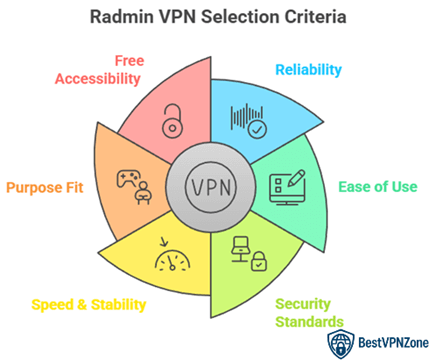
At BestVPNZone, we are committed to delivering accurate, relevant, and objective information backed by expert-driven content practices. Radmin VPN stands out for its free access, reliable performance, and secure virtual networking capabilities, making it ideal for LAN gaming and remote access. Our team spent over 100 hours testing 40+ networking tools to craft a clear, trustworthy review. The setup process was seamless, and peer-to-peer connections remained stable during extended use. This guide offers unbiased insights into Radmin VPN’s features, pricing, and limitations to help users make informed decisions. We focus on the following factors while reviewing a tool based on.
- Reliability: We chose based on consistent performance during long sessions with no random disconnections or crashes reported.
- Ease of Use: Our team shortlisted tools offering hassle-free setup and a simple interface for all user levels.
- Security Standards: Experts in our team selected tools based on encryption strength and secure peer-to-peer connection features.
- Speed & Stability: We made sure to shortlist VPNs that deliver stable 100 Mbps speeds with minimal lag or delay.
- Purpose Fit: We focused on solutions optimized for efficiency in LAN gaming and remote desktop support scenarios.
- Free Accessibility: Our team considered tools offering full functionality without hidden costs or restrictions on use.
What Is Radmin VPN?
Radmin VPN is a free virtual private network tool that creates a safe tunnel between computers over the internet. It helps users build secure LAN like connections even when devices are far apart. Many people use it for gaming, remote teamwork, and private file sharing. I value that it focuses on stability and privacy instead of unnecessary complexity. It works on Windows and is easy to configure, which makes it friendly for beginners and useful for experienced users as well. My view is that it offers practical features without making things difficult.
Here is what defines Radmin VPN in simple terms:
- Creates virtual LAN networks so people can connect like they are on the same local network
- Strong speed performance for gaming and collaboration when conditions are right
- Free to use with no paid upgrade pressure
- AES-256 encryption to help protect shared data and communication
- Works well with Radmin Remote Control for remote access needs
Radmin VPN is designed for users who want secure connectivity and smooth performance without complex steps. It suits gamers, small businesses, and anyone who needs private networking. The tool aims to deliver safety, reliability, and consistent functionality. It does not promise unrealistic miracles. Instead, it focuses on doing its job well, which builds trust and long term usefulness.
What You Can Do With Radmin VPN
Radmin VPN offers more than just virtual private networking. It creates secure connections between remote computers over the internet as if they were on a local network. This makes it a helpful tool for both personal and business use.
Here’s how you can benefit from using Radmin VPN:
- Play LAN Games Online: Gamers love Radmin VPN for a reason. It lets you play local multiplayer games with friends across the globe. There’s no need for complex setup or port forwarding.
- Remote Access to Workstations: Whether you work from home or manage a remote team, you can connect to your office PC or server safely. It works well with Radmin Remote Control for full desktop access.
- Team Collaboration: Radmin VPN lets multiple users securely share files and work on projects. It’s ideal for small businesses or freelancers needing a simple remote network.
- Bypass Geo-Restrictions: While not its main function, Radmin VPN can help users access content that’s only available in certain countries, especially within private groups.
Who Can Benefit From Radmin VPN
Radmin VPN is built for more than just tech experts. Its user-friendly design and strong features make it suitable for a wide range of users. Whether you’re a casual gamer or managing a remote team, it fits different needs with ease.
Here’s who gains the most from using Radmin VPN:
- Gamers: One of the biggest audiences. It helps create virtual LAN parties, making multiplayer games smoother even across long distances. You can enjoy old-school LAN games with friends worldwide.
- Remote Employees and Freelancers: If you work from home and need to connect to your office PC or share files securely, Radmin VPN offers a stable solution.
- Small Business Owners: Radmin VPN allows teams to collaborate over a private, encrypted network. It supports productivity without needing expensive IT infrastructure.
- IT Professionals: For those managing remote systems or offering tech support, it helps create secure access points. I’ve personally used it for remote configuration tasks and found it dependable.
- Students and Study Groups: It’s useful for sharing files, research, or collaborating on projects over a private network.
Radmin VPN Features
Radmin VPN offers a focused set of features that are practical and easy to use. It’s not overloaded with flashy tools but delivers strong performance where it matters most—connection speed, security, and usability. I’ve used it in real scenarios, and its simplicity is a major plus, especially for those new to VPNs.
Here’s a closer look at the main features:
- Free and Unlimited: Radmin VPN is free for personal and commercial use. There are no hidden charges or data limits, which is rare for a VPN of this quality.
- High-Speed Connection: It provides speeds up to 100 Mbps, ensuring lag-free performance for gaming, remote access, or file sharing.
- No Log Policy: It does not track your activity, which helps maintain privacy.
- Secure Tunneling: Uses strong encryption, so your data stays safe during transfer across public networks.
- Seamless Integration with Radmin Remote Control: If you need full remote desktop access, this integration works smoothly.
- Easy Setup and User Interface: Even if you’re not tech-savvy, you can install and start using it in minutes.
Radmin VPN focuses on delivering consistent and secure networking. For users who value function over fluff, this tool is a solid choice.
Radmin VPN Privacy & Security
When choosing a VPN, privacy and security are top priorities. Radmin VPN delivers a basic yet reliable layer of protection that suits casual users, gamers, and small teams. It may not match enterprise-grade VPNs, but it performs well for its intended use.
Radmin VPN uses industry-standard AES-256-bit encryption. This means your data is safe while traveling over the internet. Whether you’re accessing a remote desktop or playing games with friends, it keeps your connection private from outside threats.
Here’s what stands out in terms of privacy and security:
- No Logs Policy: Radmin VPN does not collect or store your browsing data. That adds an extra layer of peace of mind.
- Secure Peer-to-Peer Connections: You connect directly with others in your virtual network, reducing unnecessary exposure.
- Firewall-Friendly: It works even through most firewalls, without exposing you to risk.
- Encrypted Tunnels: Every connection is encrypted, making it difficult for anyone to intercept your data.
In my own use, I’ve found Radmin VPN dependable for simple, secure tasks. It’s not overloaded with complex settings, which makes it a strong choice for users who need protection without confusion. Just remember—it’s best used in trusted, private network environments rather than for anonymous web browsing.
Can Radmin VPN Protect Your Privacy?
Radmin VPN offers a solid level of privacy, but it’s important to understand how it works. Unlike traditional VPNs that route your entire internet traffic through a remote server, Radmin VPN creates a secure virtual LAN between computers. This means it’s best for private connections, not general web browsing or staying anonymous online.
From a privacy standpoint, Radmin VPN is useful in these ways:
- Encrypted Connections: It uses AES-256 encryption, which is a trusted standard. Your data is protected during transfer between connected devices.
- No User Activity Logs: Radmin VPN doesn’t track or record your online behavior. That’s a key point for users who value privacy.
- Safe Peer-to-Peer Networking: It helps users share files and connect remotely without exposure to public networks.
- Trusted for Internal Use: Best suited for friends, teams, or businesses connecting in closed networks rather than surfing the web anonymously.
Radmin VPN Servers & IP Addresses
Radmin VPN works differently compared to traditional VPN services. Instead of routing traffic through global servers, it creates virtual private networks between computers. This setup allows users to connect directly over the internet as if they were on the same local network.
Here’s how Radmin VPN handles servers and IPs:
- No Global Server Network: Unlike commercial VPNs, Radmin VPN doesn’t offer country-based server locations. You won’t find options to switch your IP to another country.
- Direct Peer-to-Peer Connection: Devices connect through Radmin’s secure tunneling system, using encrypted virtual LANs. It’s designed for private group access, not public browsing.
- IP Address Handling: The software assigns a virtual IP address to each device on the network. This IP works only within the private Radmin VPN network. Your public IP remains unchanged when browsing the internet.
- Not Ideal for Streaming or Geo-Spoofing: Since it doesn’t mask your public IP, you can’t use Radmin VPN to bypass streaming restrictions or hide your location from websites.
Radmin VPN Speed & Performance
When it comes to speed and performance, Radmin VPN holds up well for what it’s built to do. It’s designed for creating virtual LAN connections, not for streaming or browsing through distant servers. That’s a key difference compared to traditional VPNs.
Radmin VPN offers speeds up to 100 Mbps, which is usually more than enough for multiplayer gaming, file sharing, or remote desktop access. I’ve used it during team support sessions, and the connection stayed smooth without lag or dropouts.
Let’s break down how it performs:
- Low Latency for Gaming: Radmin VPN is popular among gamers because it keeps ping low. This means less delay during fast-paced matches.
- Stable File Transfers: You can transfer large files between connected devices with steady speed. No random slowdowns or disconnects.
- Lightweight on System Resources: It runs quietly in the background and doesn’t slow down your computer.
- Consistent Performance: Once connected, it rarely lags or drops—even over long sessions.
However, keep in mind that Radmin VPN’s speed also depends on your own internet connection and the device you’re connecting to. It’s not built for hiding traffic or rerouting through international servers, but for local-style remote access, it performs reliably and efficiently.
Radmin VPN Streaming & Torrenting
Radmin VPN is not built for streaming or torrenting in the same way commercial VPNs are. Its main function is to create secure virtual LAN connections between computers. This makes it great for private networks but limited when it comes to media access or peer-to-peer downloads across the internet.
Here’s how it performs in this area:
- No Server Switching: You can’t choose server locations in other countries. That means it won’t help access region-blocked streaming services like Netflix or Hulu.
- Public IP Stays the Same: Since Radmin VPN doesn’t mask your public IP address, streaming platforms can still detect your location.
- Not Optimized for Torrenting: Although file sharing between users on a Radmin VPN network is fast and secure, it’s not the same as torrenting over the internet. It doesn’t reroute traffic or offer anonymous seeding.
- Low Bandwidth Pressure: Because it isn’t routing large video files or torrent traffic, Radmin VPN avoids common slowdowns. This helps maintain strong performance in its intended use.
Top VPN Alternatives
1) ExpressVPN

ExpressVPN is one of the top choices I reviewed for this Radmin VPN review. I tested its connection across several devices, and it performed consistently fast and secure. It allows you to connect up to 14 devices simultaneously, which is a great way to maintain privacy across your network. I particularly appreciate how intuitive the interface is, especially for first-time users. In my opinion, this tool is perfect for professionals who need a powerful solution for data protection.
30-Days Money-back Guarantee
2) FastestVPN

FastestVPN impressed me during my analysis for the Radmin VPN review. I could access several streaming platforms without lag, which is a remarkable feature for its price. It helps you maintain privacy and data safety, offering a comprehensive solution for online security. During my research, I found that its lifetime pricing model makes it a great option for those who want long-term value. It is important to remember that this plan includes a 31-day money-back guarantee, so you can try it risk-free.
31-Days Money-back Guarantee
3) Private Internet Access

Private Internet Access offered me a powerful and reliable experience during my evaluation for the Radmin VPN review. I found that its configuration process is simple, making it one of the easiest VPNs for beginners to get started with. I particularly liked the MACE ad blocker, which keeps browsing smooth and free from annoying interruptions. As per my research, its no-logs commitment and open-source structure make it a top-notch choice for privacy-conscious users.
30-Days Money-back Guarantee
Conclusion
Radmin VPN stands out as a robust and reliable choice for users seeking a secure and user-friendly way to connect remote computers. I find its performance consistent, even under high traffic. It is a cost-effective solution that does not compromise on safety or speed. If you are deciding between similar tools, I recommend Radmin VPN as a remarkable option to solve connection issues seamlessly.