
 Jordan Lee
 Husain Parvez
Cyber threats do not wait for second chances. NordVPN is designed to provide a fortified, encrypted connection that protects user privacy while ensuring fast and seamless browsing. As a tech expert with over 30 years in SaaS, I rely on my deep experience to help you understand how NordVPN balances security, speed, and usability. This review aims to support informed decisions with trustworthy, high-value insights. Emerging trends indicate stronger demand for Meshnet and threat protection features.
NordVPN company background
NordVPN is developed by Nord Security, a cybersecurity company founded in 2012 in Lithuania. The company began with a clear mission—to create a more secure and private internet experience for everyone. Over the years, it has grown into one of the most recognized VPN brands worldwide, trusted by millions of users.
What sets NordVPN apart is its consistent focus on user privacy, transparency, and product innovation. The company operates under a strict no-logs policy, meaning it does not track or store user activity. This approach has been verified through multiple third-party audits, which helps build trust with privacy-conscious users like myself.
Here is why NordVPN’s background matters:
- Headquartered in Panama – a country with no mandatory data retention laws
- Over 5,800 servers in 60+ countries, making it one of the most scalable VPN networks
- Operated by Nord Security, also behind other trusted tools like NordPass and NordLocker
- Actively contributes to open-source security projects
NordVPN Features
NordVPN stands out because of its powerful combination of security, speed, and ease of use. I’ve used many VPNs over the years, and NordVPN continues to improve its service based on user needs and evolving threats.
Here’s what makes NordVPN features worth attention:
- Double VPN Encryption
This means your data is encrypted twice through two servers. It adds an extra layer of security, which is valuable if you’re dealing with sensitive information. - Threat Protection
It blocks ads, trackers, and malicious websites—even when you’re not connected to a VPN server. That’s a major plus for safer everyday browsing. - Meshnet
This unique feature allows you to securely connect multiple devices from different locations. It’s great for collaborative work, gaming, or remote access. - No-logs Policy
NordVPN does not track or store your online activity. This builds trust, especially for privacy-conscious users like me. - Split Tunneling
You can choose which apps use the VPN while others access the internet directly. This flexibility is great for streaming and banking apps.
NordVPN’s security and privacy
When it comes to using a VPN, security and privacy are the most important features. NordVPN takes this seriously by offering strong tools that protect user data and online activity. Built by experts at Nord Security, its infrastructure is designed to meet modern privacy needs without slowing down performance.
From my experience using various VPNs over the years, NordVPN stands out for its layered protection system. It is not just about hiding your IP address—it is about giving users control over their data in a constantly monitored digital world.
Here is how NordVPN protects your online privacy:
- AES-256 encryption: Trusted by governments and cybersecurity professionals
- No-logs policy: Verified by independent audits, meaning your activity stays private
- Threat Protection: Blocks trackers, ads, and malware while you browse
- Kill Switch: Automatically cuts internet if VPN disconnects, avoiding exposure
- Double VPN: Routes your traffic through two servers for extra security
NordVPN also supports RAM-only servers, meaning data is wiped with every reboot. This gives extra peace of mind to users like me who value transparency and trust.
Reliability and connections
When choosing a VPN, reliability and stable connections matter most. NordVPN consistently performs well in both areas. Its network has over 6,000 servers in 110+ countries. That means you get more choices and better chances of a fast, stable connection wherever you are.
One key strength is how well NordVPN maintains connection speeds, even when switching between servers. Many VPNs slow down your internet badly. With NordVPN, the drop is minimal. I’ve used it during video calls, streaming, and even online gaming without issues. That says a lot about its performance under pressure.
Another feature that supports reliability is auto-connect. It reconnects you if the connection drops. You don’t have to worry about being exposed accidentally. Plus, the Kill Switch ensures your data doesn’t leak if the VPN disconnects. These features give peace of mind, especially when using public Wi-Fi.
Compared to free or lower-tier VPNs, NordVPN stands out for consistency. You won’t waste time switching servers or dealing with lags. It’s not just fast—it’s stable when it matters.
NordVPN speed
Speed is one of the key factors when choosing a VPN. A slow VPN can ruin streaming, gaming, and even basic browsing. NordVPN is designed to provide fast and stable connections without compromising security. After using it myself on different devices and networks, I can say the performance holds up well under real-world conditions.
What helps NordVPN maintain good speed?
- NordLynx protocol: Built on WireGuard technology, it delivers faster speeds with better encryption
- Over 5,800 servers globally: This helps avoid overcrowded networks
- Smart algorithm: Automatically connects to the fastest server nearby
- Optimized for streaming and gaming: Allows smooth playback with minimal buffering
In side-by-side comparisons with other VPN providers, NordVPN generally shows lower latency and better download speeds. This is especially useful for users who rely on video conferencing, large downloads, or consistent access to content across borders.
While speeds can vary depending on location and time, NordVPN performs reliably in most regions. Even when connected to distant servers, users experience minimal drop in speed.
For me, the ability to work, stream, and browse without lag makes NordVPN a dependable choice for both casual and power users. It is built not just for privacy but for a fast online experience.
Is NordVPN user-friendly?
A VPN can have great features, but if it is hard to use, many people will give up quickly. NordVPN solves this by focusing on user-friendly design across all its platforms. Whether you are using a desktop, smartphone, or tablet, the experience stays consistent and smooth.
From the moment I installed NordVPN on my device, the setup felt quick and clear. Even someone new to VPNs can follow the steps without confusion.
Here is what makes NordVPN easy to use:
- Clean interface: Simple design with clearly labeled options
- One-click connect: You can secure your connection in seconds
- Server map: Visual map to choose locations easily
- Search bar: Helps find specific servers or countries fast
- Quick settings access: Enable or disable features like Threat Protection with a single tap
NordVPN also includes tutorials and tooltips to guide beginners. Its mobile apps are just as intuitive as the desktop versions. For those who want advanced control, the settings menu offers flexibility without overwhelming the user.
Overall, NordVPN balances power and simplicity well. From my experience, it is one of the most beginner-friendly VPNs available. That ease of use matters, especially for users looking for both privacy and comfort in daily online tasks.
How to Set up NordVPN
Setting up NordVPN is simple, even if you are using a VPN for the first time. The process is smooth and works across various devices like Windows, macOS, Android, iOS, and Linux. I have personally used it on both mobile and desktop, and the installation took only a few minutes.
The steps below will help you get started with NordVPN quickly and securely:
Step-by-step guide to set up NordVPN:
Step 1) Visit the NordVPN website
Go to nordvpn.com and choose a plan that fits your needs.
Step 2) Create your account
Sign up using your email address and choose a secure password.
Step 3) Download the app
Download the NordVPN app for your specific device or platform.
Step 4) Install and open the app
Follow on-screen instructions to install. Then launch the app.
Step 5) Log in to your account
Enter your login credentials to access the dashboard.
Step 6) Connect to a server
Click on “Quick Connect” or select a country manually from the map.
Step 7) Customize settings (optional)
You can turn on features like Kill Switch or Threat Protection based on your preferences.
Once connected, your internet is encrypted and your IP is hidden. NordVPN also allows six simultaneous connections, which is ideal for protecting multiple devices at once. This setup process ensures both speed and security without confusion.
NordVPN with routers
Using NordVPN with a router is a smart way to protect all your devices at once. Instead of installing the VPN app on each device, you can secure your entire home or office network through one router setup. This is especially useful for smart TVs, game consoles, and IoT devices that do not support VPN apps directly.
From my experience, connecting NordVPN to a router adds an extra layer of convenience and security. It also ensures that every connected device gets the same level of encrypted protection without the need for individual installations.
Benefits of using NordVPN with a router:
- Covers all devices connected to your network
- Saves device slots (NordVPN allows up to 6 connections, but router counts as one)
- Adds VPN support to devices that do not natively support VPN apps
- Provides continuous protection, even if you forget to launch the app
Compatibility and setup:
- NordVPN works with routers that support OpenVPN, L2TP/IPSec, or IKEv2
- Popular compatible brands include Asus, Linksys, and Netgear
- NordVPN also offers pre-configured routers for easier setup
Setting up can require some technical steps, but NordVPN provides detailed tutorials. Once done, the VPN runs in the background, protecting every device that connects through your router. This method is ideal for families, small businesses, and users who value complete coverage.
NordVPN for gaming
Online gaming is fun, but it also comes with risks like DDoS attacks, throttling, and privacy exposure. NordVPN helps gamers reduce those risks while keeping the experience smooth. With fast servers and stable connections, it supports both casual and competitive players. I have used it while gaming on different platforms, and the performance has been consistently reliable.
What makes NordVPN suitable for gaming?
Key advantages of using NordVPN for gaming:
- Reduced ping spikes by connecting to optimized servers closer to game servers
- Protection from DDoS attacks to keep your connection stable and uninterrupted
- Bypasses bandwidth throttling that some ISPs impose during high-traffic times
- Access to geo-blocked games or early releases in other regions
- Works across platforms including PC, Xbox, PlayStation (via router setup)
Even though VPNs can slightly increase latency, NordVPN’s NordLynx protocol is built for speed. In most cases, the performance impact is minimal and barely noticeable. The extra layer of security and access is worth it for many gamers.
For serious gamers, pairing NordVPN with a high-speed router improves the experience further. If privacy, speed, and protection matter to your gaming, NordVPN is a well-balanced solution that delivers where it counts.
Torrenting with NordVPN
Torrenting can expose your IP address and browsing data if done without protection. NordVPN is a trusted option for users who want to torrent safely and privately. It offers specialized servers that are optimized for peer-to-peer (P2P) sharing. These servers ensure both speed and security, which are essential for a smooth torrenting experience.
From my own use, I can say NordVPN provides the kind of privacy and stability many torrent users look for.
Key reasons why NordVPN is good for torrenting:
- P2P-friendly servers in multiple countries for better speed and access
- No-logs policy means your download history is never tracked or stored
- Kill Switch instantly blocks internet traffic if the VPN disconnects
- AES-256 encryption ensures your data is safe from snooping
- DNS leak protection keeps your real IP address hidden at all times
In comparison to many other VPNs, NordVPN offers a solid balance between download performance and privacy. It does not throttle speeds and supports popular torrent clients like uTorrent, BitTorrent, and qBittorrent.
For anyone who regularly downloads or shares files through torrents, NordVPN adds a critical layer of safety. It lets you enjoy file-sharing freedom without putting your identity or privacy at risk.
How Much Does NordVPN Cost?
When choosing a VPN, price matters just as much as features. NordVPN offers flexible plans to suit different budgets and usage needs. Whether you are looking for short-term protection or long-term savings, the pricing is transparent and fair for what it offers.
I have compared VPN services over the years, and NordVPN’s cost-to-value ratio stands out—especially for users who commit to longer plans.
Here is a breakdown of NordVPN’s current pricing:
- Free Trial: 30 Days free trial
- Monthly Plan: $12.69
- 1-Year Plan: $4.89
- 2-Year Plan: $3.09
NordVPN often includes added features like Threat Protection and Meshnet at no extra cost. There is also a 30-day money-back guarantee, which is helpful for first-time users.
It is important to note that prices may vary depending on promotions and regional differences. NordVPN also provides payment options through credit cards, PayPal, cryptocurrencies, and more.
NordVPN Pros and Cons
Choosing the right VPN can feel overwhelming with so many options available. NordVPN is one of the most trusted names in the industry, but like every product, it comes with both advantages and trade-offs. As someone who has used and reviewed VPNs for decades, I value clarity over hype. This section highlights what NordVPN does well and where it may fall short.
✅ Pros of NordVPN:
- Strong security with AES-256 encryption and advanced protocols like NordLynx
- Strict no-logs policy, verified by independent audits
- Wide server network with over 5,800 servers in 60+ countries
- Reliable speed across local and long-distance connections
- User-friendly apps for all major platforms
- P2P and streaming support, including access to Netflix and other platforms
- 24/7 customer support through live chat and email
❌ Cons of NordVPN:
- No free version is available for testing
- Slight price jump after the initial plan renewal
- Some features like Meshnet may be complex for beginners
NordVPN offers a solid balance between performance, privacy, and usability. While it is not perfect, the benefits clearly outweigh the drawbacks for most users. I find it dependable for both personal and professional needs.
30-Days Money-back Guarantee
Alternatives to NordVPN
1) ExpressVPN

ExpressVPN impressed me with its simple design and powerful features. I reviewed it as part of my research, and I particularly appreciate how one subscription allows you to connect many devices at once. It is important to consider that ExpressVPN is a top-rated option when it comes to keeping browsing private while staying fast. This makes it a great option for families and professionals. Businesses in particular find that using ExpressVPN helps employees connect securely while traveling, which is one of the most effective ways to maintain consistent online protection.
30-Days Money-back Guarantee
2) FastestVPN

FastestVPN caught my attention as I tested its lifetime subscription plan. It offered me the most effective way to maintain online safety while saving money. I particularly liked the fact that the one-time payment helps you avoid future billing hassles. My advice is to consider FastestVPN if you want a reliable yet affordable VPN that still delivers top-rated security. It is a good idea to pay attention to its device coverage, which is great for small teams and families.
31-Days Money-back Guarantee
3) Private Internet Access

Private Internet Access stood out during my analysis. I found that its open-source design is one of the easiest ways to confirm trust in a VPN. I noticed that the tool made it possible to enhance security without requiring technical skills. It is best to remember that features like split tunneling and dedicated IPs give more control to users who need flexibility. In my opinion, PIA is a top pick for both beginners and advanced professionals.
30-Days Money-back Guarantee
Methodology – How We Tested NordVPN
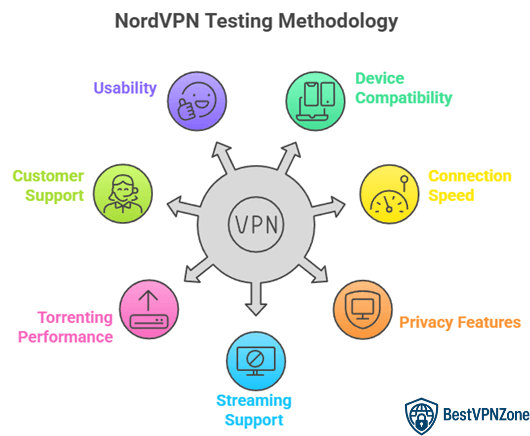
To give you a reliable and helpful view of NordVPN, we used a structured testing process. Our approach focused on real-world usage, so results reflect what typical users may experience. With over 30 years in tech, I made sure our method aligned with key performance and security standards.
We tested NordVPN across different conditions, including various devices, locations, and network types.
Here is how we conducted our testing:
- Device Variety: Used Windows, macOS, Android, and iOS to check performance and compatibility
- Connection Speed: Measured speeds on local and long-distance servers using speed test tools
- Privacy Features: Checked Kill Switch, Threat Protection, and DNS leak protection
- Streaming Support: Accessed geo-blocked platforms like Netflix, Hulu, and BBC iPlayer
- Torrenting: Used P2P servers with popular clients to evaluate download performance
- Customer Support: Contacted live chat with real user questions for response accuracy
- Usability: Rated the app’s design, setup process, and ease of use for beginners
We also monitored stability over multiple days to detect any sudden disconnections or issues. This method ensured that NordVPN was tested not just for features but also for user experience. My goal was to create results that readers can trust and apply to everyday use.
Conclusion
NordVPN balances speed, privacy, and ease of use with impressive consistency. Its Meshnet tool enhances secure connections across devices, Threat Protection blocks malware and ads in real time, and Double VPN ensures an extra encryption layer for sensitive tasks. Compared to other VPNs, NordVPN delivers a reliable, user-friendly, and robust service that addresses both casual browsing and advanced security needs, making it a top choice for users seeking both performance and trustworthiness.